NOTE: These updates are part of our October 2026 release. While you may see these features documented in our guides earlier, please note that all changes will officially go live on October 14, 2026.
October 2026
2026.10.0.0 - October 14, 2026
Improved
Interface refinements and usability improvements.
Fixed
Resolved an issue with exporting approval history using a date filter.
Improvements
Table headers now stay visible as you scroll: Table headers now remain fixed in view while scrolling through long lists on the Bank Accounts and Account Transfers pages and their History tabs, allowing you to reference column labels without returning to the top of the page.
Bug Fixes
We fixed an issue where exporting Payment Approvals or Payment Method Approvals history with a date range filter failed with an error. Filtered exports now generate files as expected.
September 2026
2026.9.1.0 - September 17, 2026
Fixed
Addressed and resolved a minor deployment issue.
2026.9.0.0 - September 16, 2026
Added
Introducing Customizable Columns and Filters.
Improved
Interface refinements and usability improvements.
New Features Added
We're excited to bring you enhanced table customization and persistent filtering capabilities for your Citizensplugin. You can now tailor your payables management workspace by personalizing visible data fields, reordering your table layout, and pinning your most-used filters, so your workspace works the way you do.
Display the exact data you need by choosing from standard and custom ERP fields, including Vendor Name, Amount Due, Due Date, Currency, and Payment Method.
2
Drag-and-Drop Reordering
Easily rearrange your table layouts by dragging and dropping columns into your preferred order.
3
Pinned Filter Views
Pin your most-used filters, such as date ranges, currency, and invoice numbers, so your search controls stay saved and ready across sessions.
4
Persistent Preferences & One-Click Reset
Your customized view is saved to your profile automatically, per workspace (such as Open Payables vs. Failed Payables).
Cross-Session Persistence: Log back in and your table is exactly where you left it, no additional setup required.
Reset to Default: Ability to restore the standard layout and filters in a single click.
5
Searchable Field Catalog
Instantly find any standard or custom ERP field using the quick-search bar in the customization panel.
Improvements
We've made a series of enhancements across the plugin to improve usability and visual clarity:
Refined payment Action Log layout: The Action Log timeline now displays with correct alignment, spacing, and styling, making it easier to track payment statuses at a glance.
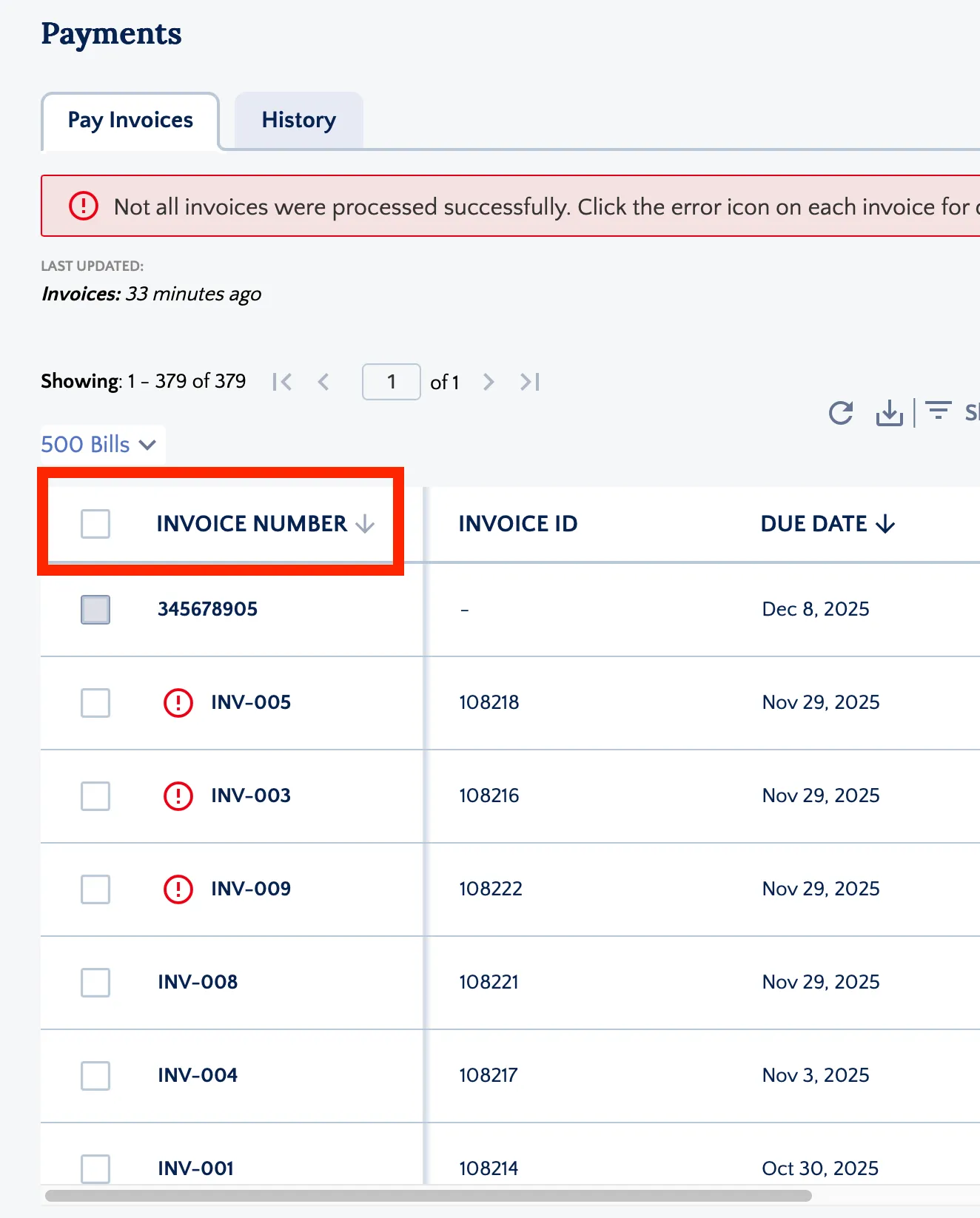
Table headers now stay visible as you scroll: Table headers now remain fixed in view while scrolling through long lists on the Payments, History, Schedule Payments, Positive Pay, and Payment Methods pages, allowing you to reference column labels without returning to the top of the page.
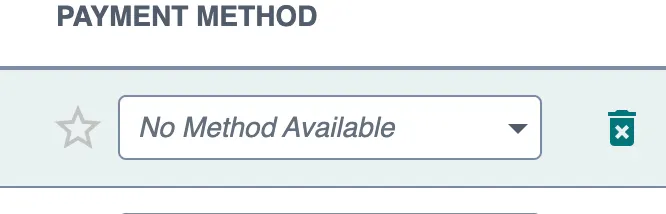
Clearer labeling when no payment methods are available: Payment method fields now display "No Method Available" when a vendor or employee has no configured payment methods, clearly indicating that no selection can be made. This applies across all payment method fields and drop-downs.
Displaying No Method Available
Improved guidance for setting up approval workflows: The Citizens plugin now offers clearer direction when approval rules have not yet been configured, distinguishing between rules that still need to be set up and an empty approval queue. When approval rules aren't yet in place in the FISPAN Portal, users see a helpful "Approval Rules Required" screen with direct links to the configuration area, guiding them to complete setup before processing payment or vendor approvals.
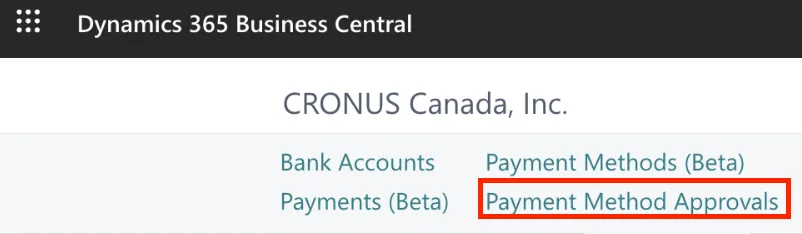
Clearer labeling for vendor change reviews: The "Vendor Record Approvals" section under Approvals is now labeled "Payment Method Approvals" to clearly indicate that pending updates relate specifically to vendor payment methods and bank details. This is a naming change only and does not affect existing permissions or pending requests.
"Vendor Record Approvals" is renamed "Payment Method Approvals"
August 2026
2026.8.0.0 - August 12, 2026
Added
Introducing the Scheduled Payments functionality.
Added
Introducing Partial Payments.
Improved
Improved bank account validation tooltip display.
Improved
Clearer guidance to the Payment Methods page.
Improved
Re-order pages in the navigation bar.
New Features Added
We're excited to announce support for Payables 2.0 - Scheduled Payments (Business Central)within the Payables (Beta) Page. You can now select a future date for payments, giving you greater control and flexibility in managing your payment workflow.
We're also introducing Payables 2.0 - Partial Payments (Business Central), a new capability for the plugin. This feature allows you to pay bills in multiple instalments directly within your ERP, without splitting bills into separate records or leaving the normal payment workflow, giving you greater cash-flow flexibility and control over your payables.
1
Flexible Instalment Payments
Pay any eligible bill in as many instalments as you need, simply edit the To Pay amount and submit through the standard payment flow.
2
Guided Input Validation
A clear range message ("Partial Payment: $0.01 – $X") appears when editing, so you always know the minimum and maximum allowed for each bill.
3
Smart Discount Handling
Discounts are automatically reserved and applied only on the final payment that clears the remaining balance, ensuring accurate reconciliation without manual tracking.
4
Seamless Remaining-Balance Tracking
After each partial payment, the bill stays available with its updated balance for future payment runs, no duplicate records or manual adjustments required.
Improvements
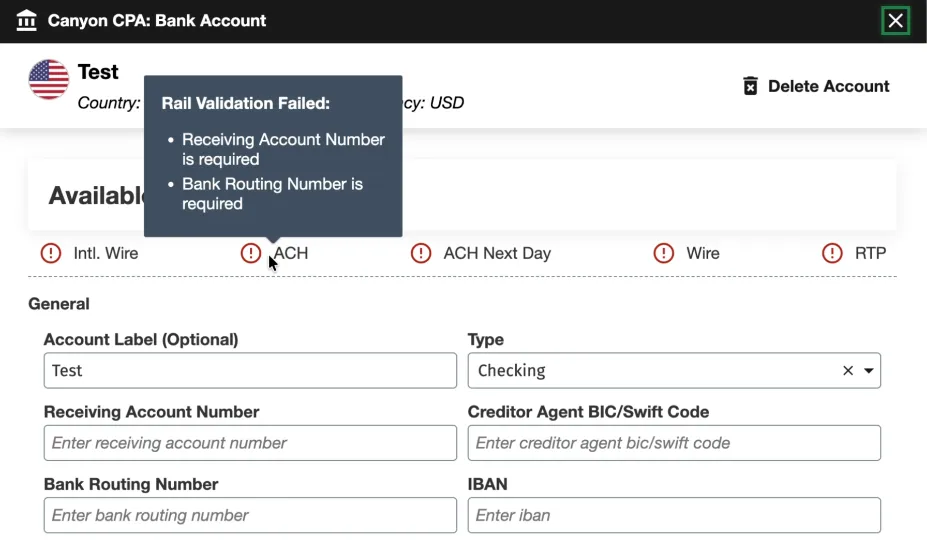
We updated the tooltips in the Bank Account configuration modal so all messages under Available Payment Methods are fully visible, clearly readable, and easy to act on regardless of your screen or modal size.
Bank Account Validation Tooltip Display
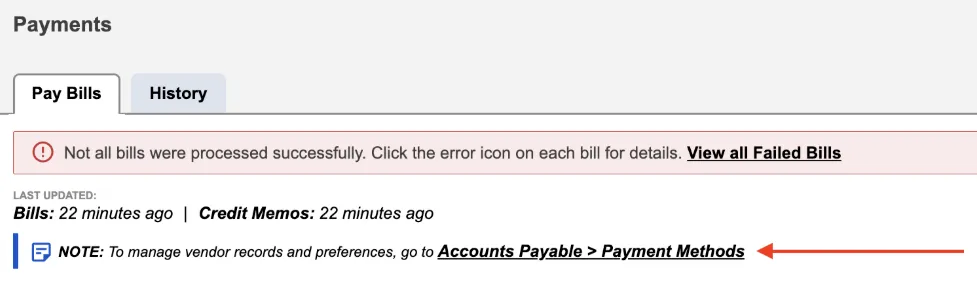
In addition, the note section on the Pay Bills page has been updated with cleaner, more direct messaging. You'll now see clear instructions directing you to the Payment Methods page whenever you need to adjust vendor records or preferences.
Simplified Vendor Management Guidance
We’ve also updated the layout of the navigation bar to offer a more logical browsing experience. Menu items have been re-ordered to group related features and workflows together, making everyday navigation more intuitive and helping you find the pages you need faster.
July 2026
2026.7.0.0 - July 15, 2026
Added
Introducing the new Account Transfers (A2A) experience.
Improved
Enhanced onboarding wizard.
New Feature Added
We are excited to introduce Account Transfers (Business Central), a brand-new feature for the plugin. This feature allows you to seamlessly manage and execute transfers between your accounts directly within your ERP, featuring a modern interface, robust tracking tools, and enhanced operational controls.
To access this feature, please reach out to your Bank Representative.
1
Modern Interface
Seamlessly initiate transfers with a guided workflow, quickly select accounts and view balances, then review a comprehensive summary before final confirmation.
2
Proactive Overdraft Warnings
Avoid processing errors with "soft warning" alerts on the amount field and a confirmation banner on the review screen.
3
History & CSV Export
Easily track transfers with a searchable, filterable history log, detailed transfer views, and CSV downloads.
4
Detailed Action Logs
Maintain a clear audit trail with timestamped status tracking for every transfer.
5
Approval-Aware Workflows
Automatically routes transfers through your existing internal Payment Approvals process before sending them to the bank.
Improvements
We've updated our onboarding wizard with new setup steps for automated workflows and approvals.
New users will now see two additional steps during initial setup:
Step 13: Set Up Approval Rules: Configure and customize your payment approval workflows during onboarding to ensure compliance and control from day one.
Step 14: Enable Bank Feeds: Seamlessly connect your bank accounts during setup to automatically sync transactions directly into your ERP, eliminating manual data entry.
NOTE: These new steps apply exclusively to new users going through the onboarding process for the very first time.
June 2026
2026.6.2.0 - June 18, 2026
Fixed
Addressed and resolved a minor deployment issue.
2026.6.1.0 - June 16, 2026
Fixed
General improvements and bug fixes.
2026.6.0.0 - June 10, 2026
Added
Introducing Sandbox Checklist.
Added
Introducing Payables Insights.
Improved
Bank Accounts page enhancements.
Improved
Enhanced Business Central-themed experience.
New Features Added
We're excited to introduce the Sandbox Checklist via the Portal, a guided, self-serve onboarding experience built directly in the FISPAN Portal to help clients get the most out of their Sandbox environment. The Sandbox Checklist is a structured list of post-onboarding sandbox checklist that guides clients through the plugin. This allows them to gain immediate clarity on the next steps once they are onboarding. It eliminates the guesswork by giving clients a clear, prioritized path through FISPAN's core capabilities, at their own pace.
1
My Journey Tab
A new My Journey tab now appears in the Citizens Portal once the onboarding wizard has been completed. This allows for tracking progress through your Sandbox. It remains up to date as you explore the plugin.
2
Automated Task Completion
As you perform actions in their ERP, such as loading bills, viewing transactions, or confirming a payment, the sandbox checklist will mark those tasks as complete upon the next refresh.
3
Tailored to Your Bank’s Products
The checklist only displays tasks relevant to the products enabled for you.
4
Learn More Redirect
The Sandbox Checklist includes a Learn More link that takes you directly to the relevant section of our Product Guide or Interactive Demo, providing step-by-step guidance exactly when and where it's needed.
Also, we are excited to launch Payables Insights (Business Central), a centralized, real-time dashboard designed to give your finance team total visibility over your accounts payable, all in one place. The Payables Insights brings your most critical financial metrics into a single, actionable view.
1
Payables Summary
Instantly review outstanding obligations with a consolidated view of overdue, current-week, and total open payables.
2
Monthly Payment Tracking
Monitor transaction statuses, including paid, processing, pending, and failed payments, within a single view to mitigate execution risk.
3
Integrated Account Balances
View near real-time, intraday balances across all connected bank accounts to optimize liquidity and funding decisions.
4
AP Aging Analytics
Visualize outstanding payables across standard aging categories to optimize working capital.
5
Vendor Spend Analysis
Identify top vendors by volume over a rolling 30-day period to support strategic sourcing and treasury reviews.
6
Payment Method Distribution
Track payment volume across payment types to manage transaction costs and efficiency.
7
Remittance Advice Tracking
If available, view remittance delivery statuses alongside an aggregate delivery success percentage rate to ensure vendor alignment.
Improvements
We are excited to announce a streamlined UI refresh and enhanced data visibility for our clients. This update focuses on better organization for diverse account types and improved transaction tracking.
The page you know as Balances and Transactions is evolving. We have rebranded this space to Bank Accounts. This new UI provides a cleaner foundation for managing multiple financial streams in one place.
To help you identify partners and sources faster, we’ve added a Counterparty Name column to the Transactions model.
NOTE: This column will appear blank as we are working on extracting out this information.
2
Dedicated Deposit Account Tabs
Organization just got easier. Use the new Deposit Account Type tab to instantly access all information related to your checking and savings accounts, keeping them organized all in one place.
3
Enhanced Filtering & Search
Stop digging through rows of data. You can now perform targeted searches and filter your views by:
Bank Reference
Customer Reference
Amount
Description
Post Date
4
Visual UI Refresh & Country Identifiers
We’ve added Country Images (flags/identifiers) to the account interface. This allows you to spot the geographic source of funds and account origins at a single glance, providing better global context for your Treasury team.
Also, we’ve enhanced the plugin experience with a refined user interface designed to create a more seamless and consistent experience across systems. Driven by customer feedback, these enhancements improve usability and navigation, seamlessly matching the native Business Central interface, while maintaining the workflows users know today. This release includes visual updates only; no functionality or processes have changed.
May 2026
2026.5.0.0 - May 13, 2026
Improved
Enhanced status accuracy for Payment History.
Improvements
We’ve updated the Payment History page to ensure all transaction statuses are accurately represented. Records designated as "Completed with Change" now populate correctly within your history view. This update ensures the continued integrity of your payment data, providing a comprehensive and reliable audit trail for all finalized transactions.
April 2026
2026.4.0.0 - April 15, 2026
Added
Introducing Product Assistant
Added
Added a new vendor configuration field.
Added
Introducing Scheduled Payments functionality pilot phase.
Improved
Performance-optimized item selection limits for the Payments and Positive Pay pages.
Product Assistant is now available on the Payables (Beta), Payment Methods (Beta), Payment Approvals, and Vendor Approvals pages.
Product Assistant uses AI to instantly cross-reference your questions with our Product Guide, delivering real-time answers and direct links to the relevant documentation. It searches publicly available Product Guide content and provides trusted guidance, feature explanations, and links to source documentation directly in the experience. Product Assistant is a guidance tool only and does not make changes in the ERP or plugin.
2
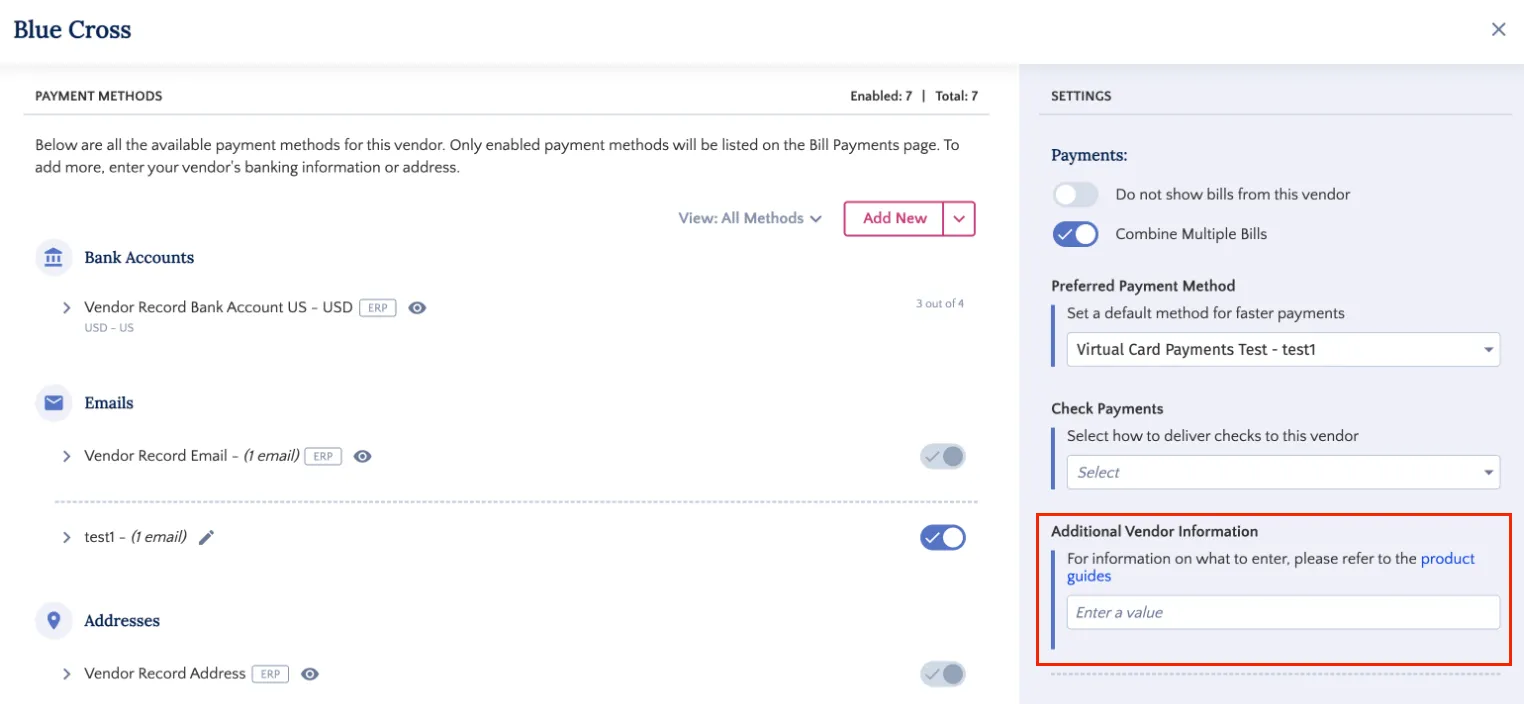
Additional Vendor Information Field
We’ve also introduced a new, flexible 'Additional Vendor Information' field within the payment method configuration. This feature allows users to provide supplemental, vendor-specific data required by your bank to ensure seamless payment processing.
We're also excited to announce support for Scheduled Payments within the Payments (Beta) page. You can now select a future date for payments, giving you greater control and flexibility in managing your payment workflow. Please note that this product is currently in a pilot phase. To inquire about being added to the pilot, please contact your bank representative directly.
Improvements
To ensure system stability and peak performance, we have introduced selection caps on the Payments and Positive Pay pages. These guardrails prevent the processing of excessively large batches that could lead to latency or errors.
Payments Page: Selection is now limited to a maximum of 2,000 items.
Positive Pay Page: Selection is now limited to a maximum of 1,000 items.
March 2026
2026.3.0.0 - March 11, 2026
Added
Introducing Payments (Beta) and Payment Methods (Beta).
Added
Introducing the Positive Pay feature.
New Features Added
We're thrilled to announce the next generation of the Payables experience (Payables 2.0) with the introduction of two new modules: Payments (Beta) and Payment Methods (Beta). These new interfaces deliver powerful new capabilities to help you streamline payment runs and reduce errors.
Multi-Source Account Payment Runs: Initiate payments across multiple currencies and bank accounts in a single payment run. Previously required separate runs are now handled in one streamlined process.
Multi-Source Account Payment Runs
Retain Bill Selection: Select bills across multiple pages without losing your previous selection, and apply different filters while maintaining your selection.
Fixed Columns: Key information (Vendor Name, Amount) now remains visible at all times as you scroll horizontally. Quickly reference critical payment details without scrolling back.
Fixed Columns
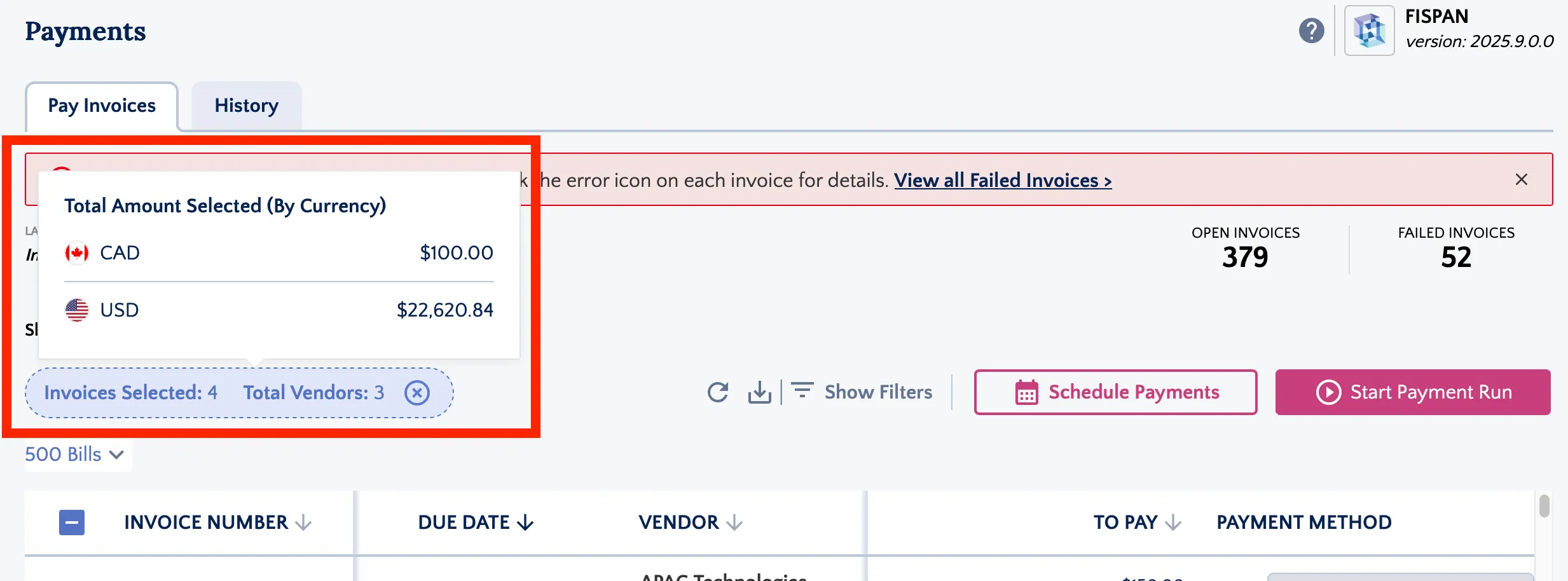
Batch Summary: Bills and Vendors selected for payment are now summarized and broken down by currency at the top of the Payments (Beta) page.
View Batch Summary of Selected Invoices
Enhanced Filtering: Filters are now available for every column on the Payments (Beta) page. Find and organize payments with greater precision.
Quick Actions: Set a vendor's default payment method directly from the Payments (Beta) page, eliminating unnecessary navigation to vendor settings.
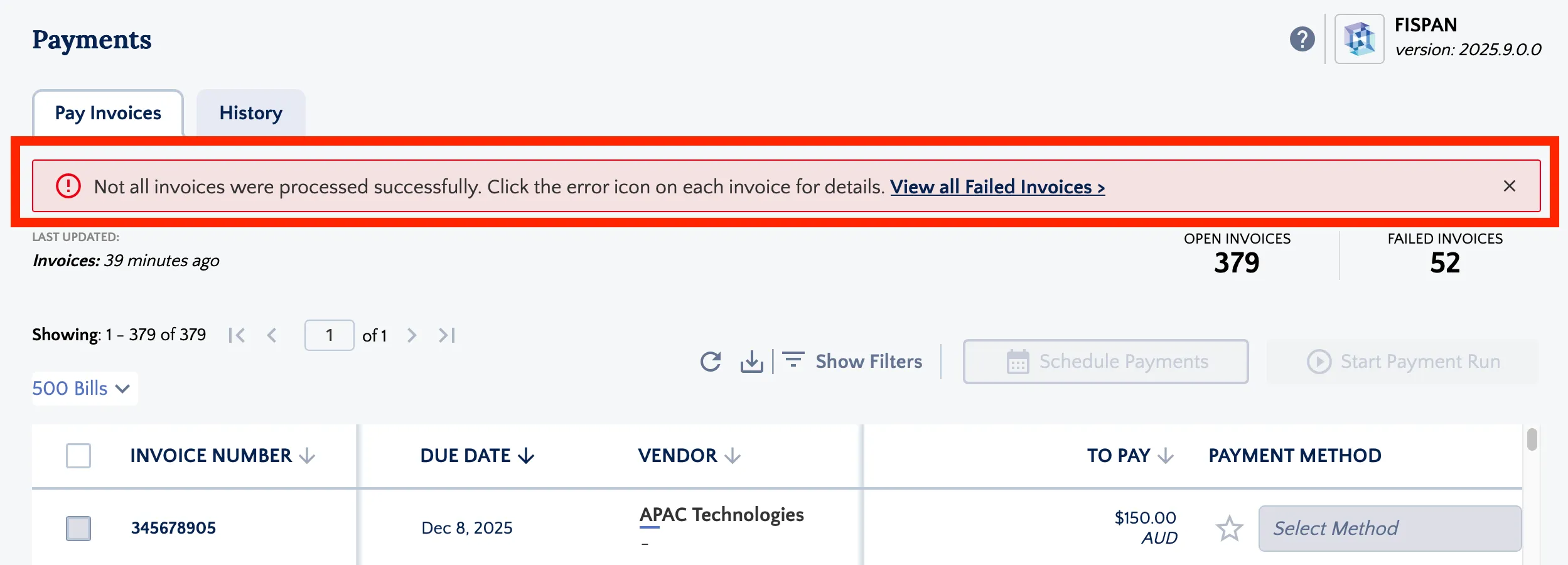
Failure Alerts: A new banner on the Payments (Beta) page alerts you immediately if one or more payments fail within a run, allowing you to catch issues early and take corrective action quickly.
Click failed payments banner
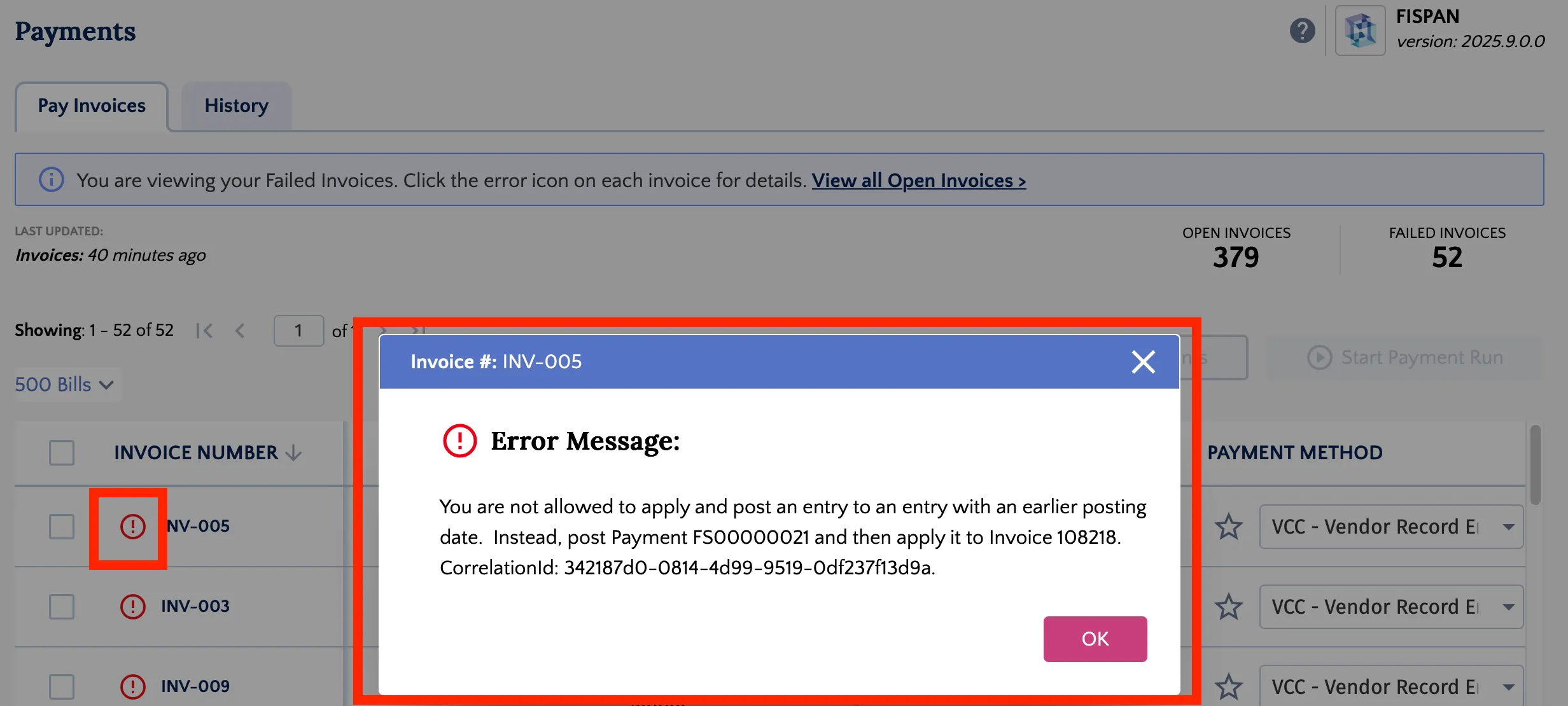
Detailed Error Insights: Failed payments now display an error icon within the list of open bills. Click the icon to reveal the specific error message for rapid troubleshooting.
Review error message
Vendor Health Alert: An alert at the top of the Payment Methods (Beta) page notifies you if any vendors are missing a default payment method. Addressing missing payment methods ensures smoother payment runs.
Exclude Vendors: Select any vendors that would never be paid in the plugin by preventing their bills from appearing in the Payments (Beta) page.
For more information on Payments (Beta) and Payment Methods (Beta), please refer to the pages linked below:
We’re also excited to introduce the Positive Pay feature—designed to enhance the security and efficiency of your check payment process. Now you can quickly and safely send detailed check files directly to your bank, reducing fraud risk and simplifying your payment workflows.
1
Streamlined Check Transmission
Automatically extract check details from Business Central and transmit your entire check run to the bank with just a few clicks—saving time and minimizing manual effort.
2
Real-Time Dashboard & Alerts
See counts of Open, Failed, and Invalid checks at a glance, with instant alerts highlighting issues that need your attention.
3
Seamless Payment Approvals Integration
If Payment Approvals is enabled, Positive Pay transactions move into the approval workflow before final transmission, ensuring proper controls while preventing delays.
4
Comprehensive Audit Trail & History
Track every transmission’s real-time status — Completed, Failed, or In Progress — with detailed feedback messages and who initiated the transmission.
5
Exception Handling & Resolution
Easily identify invalid checks caused by bank account mismatches and resolve issues through the FISPAN Portal. Unwanted checks can be removed from the plugin without affecting Business Central data.
To access this feature, please reach out to your Bank Representative. For more information on the Positive Pay feature, please refer to our Product Guide:
We've upgraded the plugin to ensure more reliable and seamless data exchange. This enhancement provides strong character support, allowing the system to effectively process all standard global characters (UTF-8) found in transaction descriptions, eliminating past interruptions.
We've improved the user experience on the Payment Approval Request page to enhance efficiency in managing your assigned tasks. The page now defaults to the "Show Assigned to Me Only" filter, ensuring that upon loading, you immediately see the relevant payments requiring your approval.
October 2025
2025.9.1.0 - October 29, 2025
Fixed
We addressed and resolved the deployment issue.
2025.9.0.0 - October 15, 2025
Improved
The plugin base version has been upgraded from v21 to v24. This upgrade involved updating dependencies, platform versions, and runtime configurations to align with the latest v24. Please ensure your ERP version is at least 24 before updating your plugin.
To learn more about version numbers in Business Central, please click here: https://learn.microsoft.com/en-us/dynamics365/business-central/dev-itpro/administration/version-numbers
Improved
We've successfully resolved the compatibility issues between your bank plugin and Microsoft's Business Central version 27.0.38460.38988. This fix addresses the concerns you may have previously received from Microsoft regarding potential compatibility problems.
You can now proceed with your Business Central upgrade. Please ensure you upgrade your plugin before upgrading your ERP to version 27.
September 2025
2025.8.0.0 - September 10, 2025
Improved
As part of our ongoing efforts to maintain consistency across the platform, we’ve updated the Payment Details page within the Activity view to reflect current interface standards.
August 2025
2025.7.0.0 - August 13, 2025
Fixed
The vendor approval feature has been improved to handle email addresses in a case-insensitive manner (e.g., [email protected]). This ensures that users can approve requests regardless of how their email address is capitalized.
Improved
The payment status display has been updated to include a new status, "Waiting for Approval" to all relevant History pages. This improvement gives you a more precise understanding of where your payment is in the process, making it easier to track transactions that are pending review. Please note that this new status will be visible on all new transactions going forward.
Added
You may now see that the Payment Approvals product is available with your ERP. Please note, this product is currently in a pilot phase. To inquire about being added to the pilot, please reach out directly to your Bank Representative.
We've updated the plugin to support email addresses with multiple periods in their domain names. This improvement ensures greater flexibility and accuracy when entering and storing email information. You can now successfully add and validate email addresses like [email protected].
2025.5.0.0 - June 11, 2025
Improved
We have renamed all references to BAI Code to Transaction Code in the Balances & Transactions section and the Transaction Details pop-up. This change helps us better support global clients and aligns with industry standards.
Improved
We have enhanced our approval process to give you more control and flexibility. Previously, users could approve their own changes by default. We've updated this default setting so that now, for any changes submitted by a user, a different user will need to provide approval.
Fixed
We fixed an issue where the account label on the Payment Methods page was not updating correctly. Account labels should now be editable as expected.
May 2025
2025.4.1.0 - May 16, 2025
Fixed
We resolved an issue where the bill checkbox was disabled on the Pay Bills page even when payment methods were selected.
2025.4.0.0 - May 14, 2025
Fixed
We have fixed a bug where column headers would overlap content when scrolling. This update ensures that headers remain clearly visible and don’t obscure underlying information, leading to a more readable and user-friendly experience.
Added
We are excited to announce a new feature for Vendor Bank Details Approvals through the Citizens plugin in Business Central. This new feature streamlines the approval process, improves data accuracy, and enhances security and granular control over vendor banking information within the plugin.
Key Features and Benefits:
* Multi-level Approvals: Establish up to three approval levels with multiple approvers at each level, requiring a specified number of approvals for each stage.
* Approval History: Maintain a comprehensive audit trail of all approval requests, including approved, rejected, and pending requests, with detailed information about each action.
* Impact on Payment Processing: Pending approval requests prevent payments to the affected vendor, ensuring payments are processed only with accurate and approved bank details.
* Approval Workflows: Define customized approval processes for different types of vendor bank detail changes (updates, additions, deletions).
* ERP-Synced Change Handling: Approvals are required for manual changes within the FISPAN plugin. Changes originating from your ERP system are automatically synced, preventing accidental overwrites and ensuring data consistency.
To access the Vendor Bank Details Approval module, please follow the below steps:
* Access Approval Workflows: Log in to the FISPAN Portal (sys.fispan.live) and navigate to the Vendor Record Approvals section in the Control Center.
* Create and Manage Workflows: Define your approval workflows, specifying approvers, required approvals, and applicable entities.
* Review and Approve Requests: Access pending approval requests within the Intacct plugin, review the proposed changes, and approve or reject them accordingly.
For more details on the Vendor Bank Details Approval module, please refer to our Product Guide:
We have implemented an additional layer of protection in the plugin to prevent clients from processing payments for the same bill multiple times. This update adds additional validation for records within the ERP to ensure the most up to date data is used when processing payments.
2025.2.0.0 - March 12, 2025
Added
We have added additional Purpose of Payment Codes for international payments to China.
Improved
We have replaced the Purpose of Payment Code with Purpose of Payment message for international payments to the Philippines in PHP currency.
Added
Added support for storing payment information for the following countries: Albania, Barbados, Bosnia & Herzegovina, Chad, Central African Republic, Equatorial Guinea, Gabon, Democratic Republic of Congo, Ghana, Jamaica, Liechtenstein, Tanzania, Guinea-Bissau and Uganda.
2025.1.0.0 - January 15, 2025
Fixed
General improvements and bug fixes.
2024.7.0.0 - August 14, 2024
Fixed
General improvements and bug fixes.
2024
July 17, 2024
Added
Payment Method Code Column Added to Payment Methods Page
In Business Central, on the native vendor record, clients can set a default Payment Method Code. This is different from the default payment method that is used to process payments through the plugin. This field has been added as a separate column to the Payment Methods page to support an easier selection of default payment method options and streamline the payment setup process.
Added
Populate the Email Remittance Group if Only One is Available
A vendor’s selected email remittance group will now auto-populate when only one email group is available. This enhancement streamlines the process by eliminating the need for clients to manually select an email group for each vendor.
Improved
Rows are now Clickable on the Payment Methods Page
Improved user experience to allow clients to click anywhere within a row on the Payment Methods Page to open the Payment Method Editor, making it easier and more efficient to manage payment details.
Improved
Edit Button (Pen Icon) Displays Only on Hover
Improved user experience to ensure the Pen Icon,which allows clients to edit a payment method, is only displayed when hovering over the payment method in question.
Fixed
Bug fixed to ensure that the Payment Confirmation popup is scrollable allowing all payment details to be accessible and visible.
2024.5.0.0
May 15, 2024
Fixed
We've fixed a bug that caused the Remittance column to appear for all clients, regardless of whether they had the feature enabled. Now, the Remittance column will only appear visible to clients who have the feature enabled.
Added
Previously, the Vendor No. filter on the Pay Invoices required an exact match to filter the page. Now, the filter will load bills if there is a partially matching Vendor No. entered in the filter. Please note, that if a large number of invoices are for a vendor with a partially matching Vendor No., you may see increased waiting time for the page to load.
Added
Previously, authenticating users needed access to the TableData object 380 within the plugin to make payments. We've removed this requirement by making improvements to permissions. If you are running into permission errors when making payments, please ask your administrator to reauthenticate through the wizard and re-assign their plugin permissions to themselves.
2024.4.0.0
April 10, 2024
Fixed
Fixed a bug in the Help Dropdown to ensure all available options are displayed correctly on top of the page's table. Previously, the dropdown would be hidden under the page’s table, leading to those options being hidden from clients.
Fixed
Previously, the Last Updated time on pages would not update to reflect syncs occurring while the page was open. This has now been improved to accurately reflect syncs in real-time when clients refresh the page.
Fixed
When opening dialog boxes on the Payment Method page, columns in the background would become distorted on larger screens. This issue has been fixed to ensure that columns remain static and undistorted regardless of screen size.
Fixed
Previously, on the Bank Statement page, if a client applied a date filter and navigated through multiple pages, the pagination would freeze, preventing further navigation. This issue has been resolved, allowing clients to navigate through multiple pages of transactions even with a date filter applied.
Fixed
Previously, when clients applied multiple filters, they would be cut off and become difficult to see on smaller screens. This section has become scrollable, ensuring that all filters can be easily viewed, added, and modified.
Added
A line has been added at the bottom of the last record on a page when there are only a few records present, enhancing the page's appearance and preventing the last record from appearing long.
Added
The new Bank Feeds Service has been updated to handle large transaction volumes (1000+) more efficiently, minimizing the risk of timeout errors. This improvement doesn't affect client experience; clients can still pull in transactions as they normally would without any changes. There is no impact to users on the Legacy Bank Feeds.
2024.3.0.0
March 13, 2024
Fixed
Previously, the plugin only supported up to 50 batched invoices in one payment. We have now increased the limit to be able to support an unlimited number of batched invoices in one payment.
Added
In Business Central, there are various “roles” available to clients. These roles have different views for users which highlight different key modules based on where the user is likely most active. In this plugin release, we have added support for the AP Coordinator role to be able to see the plugin from the navigation bar.
Added
The plugin can sync semi-colon-separated emails from the Business Central vendor record. This ensures that multiple emails are accurately imported and saved as separate entries within an email group on the plugin’s Payment Method page. Previously, semi-colon-separated emails would not be synced into the plugin.
2024.2.0.0
February 14, 2024
Fixed
Resolved a bug which prevented users from selecting invoices across pages. This has been improved so users can select bills across all pages or exclusively on the current page, with a dynamic bill count updating for clarity.
Added
The Vendor Invoice No. field is now mapped to the Payment Reference field in the Vendor Ledger Entries. Note, that when payment entry batching is enabled and combined invoices are enabled for a vendor, this field will not be populated.
Added
This release introduces enhanced batching for payment entries. When the combined invoices toggle is enabled for a vendor and the batching of payments toggle is also enabled, all payment entries in Business Central will be batched. To enable batching, please navigate to the Settings page and toggle on the “Payment Entry Batching” button.
Introducing the Citizens plugin for Business Central 365! Seamlessly execute ACH, Wire, and Check payments directly from your ERP. Enhance efficiency by streamlining bank reconciliation through integrated bank feeds.
Added
The addition of new filters on the Pay Invoices page: Vendor ID and Discount Due Date. The Payment Method column is now also sortable.
Added
We're introducing the latest enhancement: the new Bank Feeds product for the Business Central plugin! This update revolutionizes the way you handle bank transactions by eliminating the need to select date ranges. Here's what you can expect from this release:
Key Features and Benefits:
Daily Transaction Updates: Experience seamless daily bank transaction imports without the hassle of manually selecting date ranges. You now need to just click “Import” and all transactions since your last download will be imported.
Easy Setup: Get up and running within minutes! Say goodbye to the time-consuming process of mapping data exchange fields to access additional data.
Reduced Duplicate Transaction Risks: Minimize the likelihood of accidentally selecting and importing duplicate transactions.
Enhanced Transaction Details: Enjoy a richer set of transaction details and increased data availability, ensuring a smoother reconciliation experience.
Action Required:
To leverage the new Bank Feeds product, follow these steps:
Update Your Plugin: Ensure you have the latest version of the plugin installed.
Setup Guidance: Refer to our setup guide [https://support.fispan.com/citizens/enabling-bank-feeds-bc365] for step-by-step instructions on using the new Bank Feeds product.