CNB Remittance Advice (NetSuite)
With CNB’s remittance advice, the vendor's remittance details of payments made through the plugin for ACH and Wire payments are sent to them automatically via email.
Speak with your CNB Sales Representative to add remittance advice to the EASI Link Connector.
Once a vendor is set up in the plugin with the required information, such as a valid email address, the system will automatically compose and send an email to your vendor with your company name, total amount paid, invoice date(s), reference number, and invoice memos(s), giving your team back that time for other value-add tasks.
Information Field Mapping
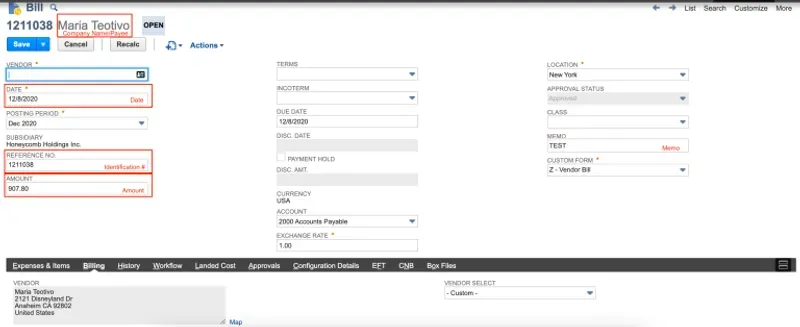
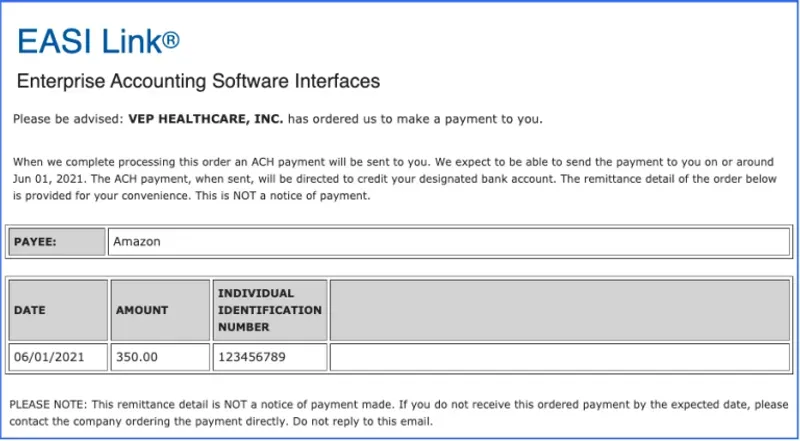
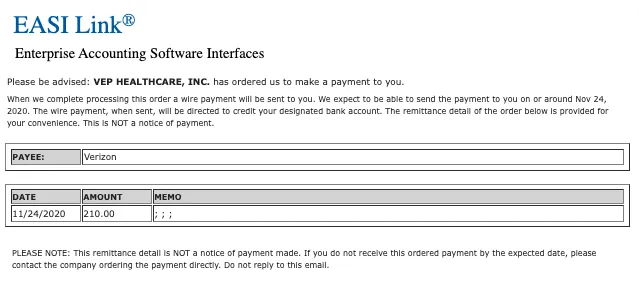
The information on the remittance advice will include: your company, the vendor company name, total amount paid, invoice date(s), and invoice number(s).
ACH Payment Remittance Email Example
Wire Payment Remittance Email Example
IMPORTANT: For the CNB Remittance Advice, please follow these guidelines:
Domestic/International ACH
- Add up to two emails separated by a semi-colon, 128 character limit
Domestic/International Wire
- Add emails separated by semi-colon, 128 character limit
FAQs
The FISPAN plugin utilizes the CNB remittance advice service. If you have further questions about CNB remittance advice, please feel free to contact your CNB bank representative.