NOTE: These updates are part of our October 2026 release. While you may see these features documented in our guides earlier, please note that all changes will officially go live on October 14, 2026.
October 2026
2026.10.0 - October 14, 2026
Added
Introducing credit memo support in Cash Application.
Fixed
Resolved an issue with exporting approval history using a date filter.
New Features Added
Cash Application now syncs credit memos from NetSuite and applies them to open invoices when matching deposits.
Automated Matching: Credit memos are matched to invoices through logic-based and remittance-based matching.
Edit Before Approval: Add or remove credit memos from a match during approval.
Posted to NetSuite: Approved credit memos are applied to the matched invoices when the customer payment posts.
Bug Fixes
We fixed an issue where exporting Payment Approvals history with a date range filter failed with an error. Filtered exports now generate files as expected.
September 2026
2026.9.0 - September 16, 2026
Added
Introducing the New Payments Experience.
Improved
Improved guidance for setting up approval workflows.
Improved
Enhanced payee name for Positive Pay files.
Improved
Introducing invoice deep linking.
Fixed
Refined plugin layout for the NetSuite Redwood experience.
New Features Added
We're excited to announce the New Payments Experience for NetSuite, a reimagined payment workflow designed to give you more control, speed, and flexibility.
1
Partial Payments
Easily split bill payments across multiple transactions without manual workarounds.
2
Flexible Payment Runs
Process multiple currencies from multiple bank accounts in a single run.
3
Faster Interface
Experience significantly faster page loads and payment processing times.
4
Payment Method Pre-Validation
Prevent failed payments by only being presented with available payment methods.
5
Simplified Payee Management
Manage all vendor/employee payment preferences and banking details on a single, centralized page.
Getting started: The New Payments Experience is currently in beta. If you'd like early access, please reach out to your bank representative or contact support.
Improvements
The Citizens plugin now offers clearer direction when approval rules have not yet been configured, distinguishing between rules that still need to be set up and an empty approval queue. When approval rules aren't yet in place in the FISPAN Portal, users see a helpful "Approval Rules Required" screen with direct links to the configuration area, guiding them to complete setup before processing payment or vendor approvals.
We've also improved Positive Pay file generation to ensure payee names match your printed checks seamlessly. The system now reliably prioritizes custom check payee details, such as "Print on Check As," ensuring accurate vendor information, smoother bank processing, and a more streamlined payment workflow.
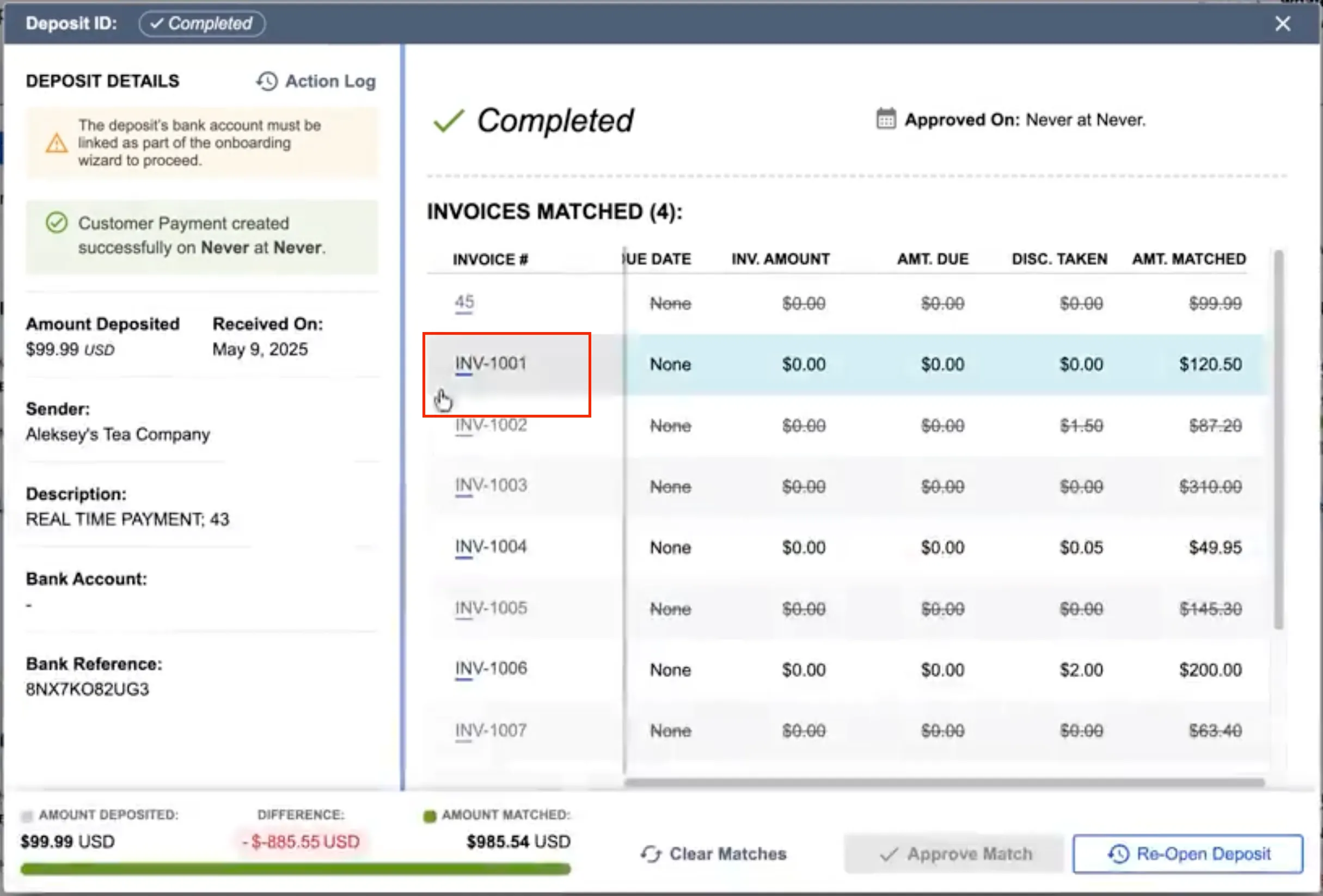
In addition, you can now navigate instantly from the Cash Application deposit details to specific invoice records in your ERP by selecting the invoice number.
Invoice Deep Link
We’ve refined the plugin layout for the NetSuite Redwood Experience. Pages now display with consistent padding, spacing, and alignment across the Classic, Redwood, and NetSuite Next experiences.
August 2026
2026.8.0 - August 12, 2026
Added
Introducing the Scheduled Payments functionality.
Added
Introducing the Cash Application Insights.
New Features Added
We're excited to announce support for Scheduled Payments (NetSuite)within the Payables (Beta) Page. You can now select a future date for payments, giving you greater control and flexibility in managing your payment workflow.
Also, we are launching the Cash Application Insights (NetSuite), a centralized, real-time dashboard designed to give your finance team complete visibility into your Accounts Receivable (AR) metrics and cash application performance, all in one place over a rolling 30-day period.
1
Pending Approval & Exception Management
Instantly review deposits awaiting approval alongside dollar values and oldest settlement dates. Easily flag unlinked remittances or invalid data errors before they impact processing.
2
Automated Match Rate Analytics
Track exact system accuracy with real-time match rate metrics for both deposits and invoices that were automatically matched and approved without manual intervention.
3
Quantified ROI & Time Savings
Measure the direct business impact of your automation with estimated labor cost and time savings over the past 30 days compared to manual cash application.
4
Receivables & Payment Forecasting
Forecast cash flow using clear breakdowns of open invoices, categorized by overdue, due this week, and due next week, paired with payment method distribution trends.
5
Actioned Deposit & Invoice Performance
Gain granular visibility into how payments are processed, analyzing logic-matched, remittance-matched, and user-edited deposits to continuously optimize matching workflows.
July 2026
2026.7.0 - July 15, 2026
Improved
Enhanced onboarding wizard.
Improved
Additional Vendor Information Field.
Improved
Accounts Receivable and email remittance matching enhancements.
Improvements
We've updated our onboarding wizard with new setup steps for automated workflows and approvals.
New users will now see two additional steps during initial setup:
Step 11: Set Up Approval Rules: Configure and customize your payment approval workflows during onboarding to ensure compliance and control from day one.
Step 12: Enable Bank Feeds: Seamlessly connect your bank accounts during setup to automatically sync transactions directly into your ERP, eliminating manual data entry.
NOTE: These new steps apply exclusively to new users going through the onboarding process for the very first time.
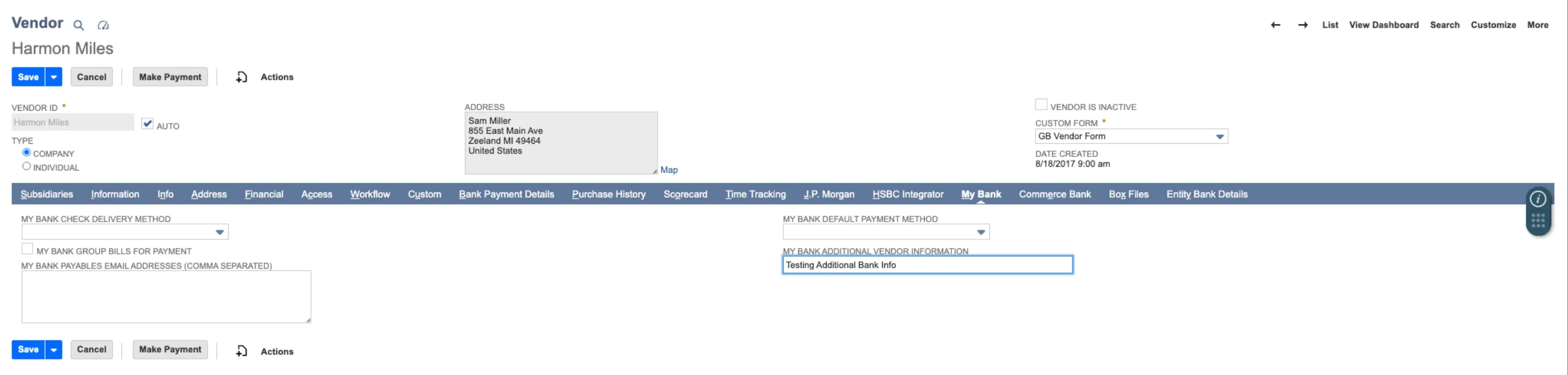
Also, we've introduced a new vendor-specific field, Additional Vendor Information, that allows you to pass custom metadata when creating payment instructions.
June 2026
2026.6.0 - June 10, 2026
Added
Introducing Sandbox Checklist.
Improved
Bank Accounts page enhancements.
Improved
Enhanced NetSuite-themed experience.
Improved
Accounts Receivable and email remittance matching enhancements.
New Features Added
We're excited to introduce the Sandbox Checklist via the Portal, a guided, self-serve onboarding experience built directly in the FISPAN Portal to help clients get the most out of their Sandbox environment. The Sandbox Checklist is a structured list of post-onboarding sandbox checklist that guides clients through the plugin. This allows them to gain immediate clarity on the next steps once they are onboarding. It eliminates the guesswork by giving clients a clear, prioritized path through FISPAN's core capabilities, at their own pace.
1
My Journey Tab
A new My Journey tab now appears in the Citizens Portal once the onboarding wizard has been completed. This allows for tracking progress through your Sandbox. It remains up to date as you explore the plugin.
2
Automated Task Completion
As you perform actions in their ERP, such as loading bills, viewing transactions, or confirming a payment, the sandbox checklist will mark those tasks as complete upon the next refresh.
3
Tailored to Your Bank’s Products
The checklist only displays tasks relevant to the products enabled for you.
4
Learn More Redirect
The Sandbox Checklist includes a Learn More link that takes you directly to the relevant section of our Product Guide or Interactive Demo, providing step-by-step guidance exactly when and where it's needed.
Improvements
We are excited to announce a streamlined UI refresh and enhanced data visibility for our clients. This update focuses on better organization for diverse account types and improved transaction tracking.
The page you know as Balances and Transactions is evolving. To support our expanding ecosystem of account types, we have rebranded this space to Bank Accounts. This new UI provides a cleaner foundation for managing multiple financial streams in one place.
IMPORTANT: Action Required for Bank Account Permissions
Upgrading to this release replaces the previous Balances & Transactions (B&T) page. After updating, all users will temporarily lose access until permissions are re-granted.
To restore access, administrators must:
Grant users permission to the new Bank Accounts page.
Assign the appropriate ERP permissions within the new Bank Accounts page settings.
To help you identify partners and sources faster, we’ve added a Counterparty Name column to the Transactions model.
NOTE: This column will appear blank as we are working on extracting out this information.
2
Dedicated Deposit Account Tabs
Organization just got easier. Use the new Deposit Account Type tab to instantly access all information related to your checking and savings accounts, keeping them distinct from other account types.
3
Enhanced Filtering & Search
Stop digging through rows of data. You can now perform targeted searches and filter your views by:
Bank Reference
Customer Reference
Amount
Description
Post Date
4
Visual UI Refresh & Country Identifiers
We’ve added Country Images (flags/identifiers) to the account interface. This allows you to spot the geographic source of funds and account origins at a single glance, providing better global context for your Treasury team.
We’ve also enhanced the plugin experience with a refined user interface designed to create a more seamless and consistent experience across systems. Driven by customer feedback, these enhancements improve usability and navigation, seamlessly matching the native NetSuite interface,while maintaining the workflows users know today. This release includes visual updates only; no functionality or processes have changed.
May 2026
2026.5.3 - May 15, 2026
Fixed
Minor system updates to ensure seamless payment approvals.
2026.5.0 - May 13, 2026
Fixed
Enhance bank account name tooltips on the Pay Bills page.
Improved
General improvements for Accounts Receivable and email remittance matching.
Improvements
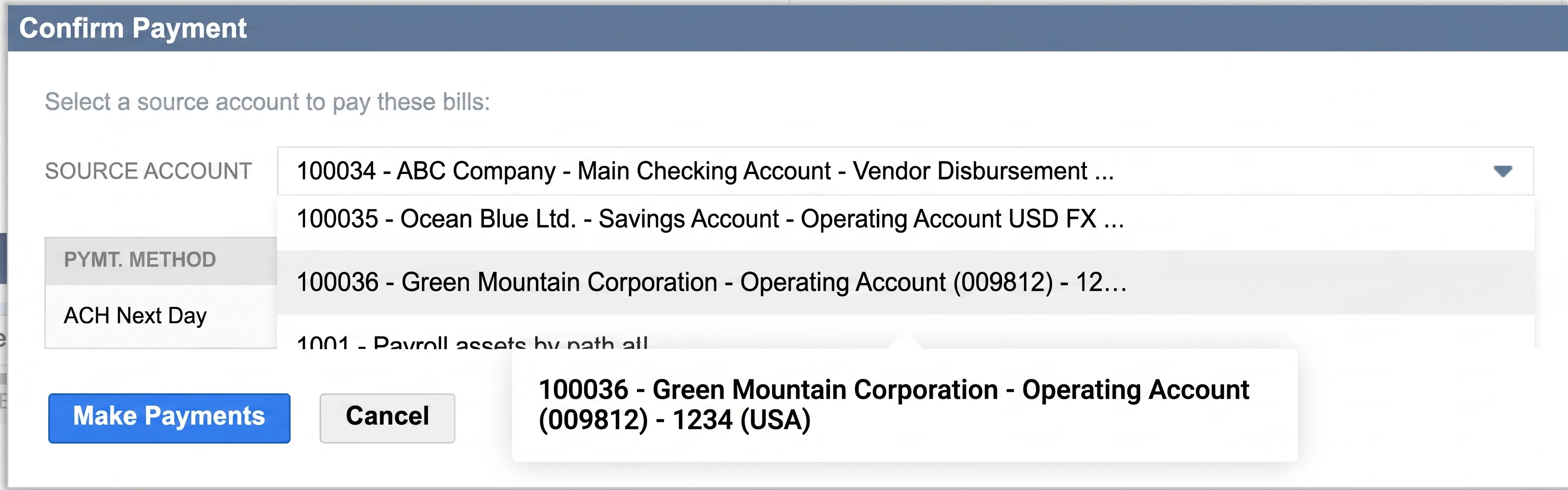
We’ve fixed a display issue on the Pay Bills page where tooltips for bank accounts with long names weren't appearing correctly in the Confirm Payment pop-up. Now, when you hover over a truncated name, the full account title displays clearly, allowing you to verify your payment details with total confidence before submitting.
Confirm Payment Pop-up
April 2026
2026.4.0 - April 15, 2026
Added
Introducing Product Assistant.
Added
Introducing Scheduled Payments functionality pilot phase.
Added
Real-Time Payments (RTP) feature enabled for pilot testing.
Product Assistant is now available on the Payment Approvals pages.
Product Assistant uses AI to instantly cross-reference your questions with our Product Guide, delivering real-time answers and direct links to the relevant documentation. It searches publicly available Product Guide content and provides trusted guidance, feature explanations, and links to source documentation directly in the experience. Product Assistant is a guidance tool only and does not make changes in the ERP or plugin.
We're excited to announce support for Scheduled Payments within the Payments (Beta) page. You can now select a future date for payments, giving you greater control and flexibility in managing your payment workflow. Please note that this product is currently in a pilot phase.
To inquire about being added to the pilot, please contact your bank representative directly.
Features Added For Testing
Real-Time Payments (“RTP”) has been enabled in the Citizens plugin for testing purposes only. While this payment option may be visible, it is not yet active for client use. The feature is expected to become available in the coming months to support payment processing in the US.
Updates
We have enhanced our Bank Feeds integration to fully support the new custom scheduling and transaction import features in NetSuite's 2026.1 release. During initial account setup, you can now independently select a custom start date to automatically sync up to 60 days of historical transactions. This update eliminates our previous "tomorrow onwards" restriction, meaning you no longer need to contact Support to backfill past data. Additionally, our service seamlessly responds to NetSuite's new custom scheduling, ensuring your data imports exactly when you need it. For clients still operating on NetSuite 2025.2, our system will automatically sync up to the last 60 days of historical data by default upon connecting.
Improvements
General improvements and minor bug fixes for Accounts Receivable and email remittance matching.
March 2026
2026.3.0 - March 11, 2026
Improved
General improvements.
Improvements
General improvements and minor bug fixes for Accounts Receivable and email remittance matching.
We're excited to announce support for Receivables Cash Application. ACH and Wire deposits can now be automatically matched against your open invoices using email remittance when available and smart logic otherwise. Please note that this product is currently in a pilot phase. To inquire about being added to the pilot, please contact your bank representative directly.
For more information on the Receivables Cash Application functionality, please refer to the pages linked below:
To ensure the ongoing stability of our NetSuite integration, we have introduced enhanced performance monitoring. This allows our team to proactively maintain the plugin and resolve technical hurdles before they impact your workflow. By understanding how our plugin performs in your environment, we can optimize stability and ensure a seamless experience for your team.
2025
November 2025
2025.11.0 - November 12, 2025
Improved
Payment approval filter enhancement.
Fixed
Bug fixes for processed transactions.
Improvements
We've improved the user experience on the Payment Approval Request page to enhance efficiency in managing your assigned tasks. The page now defaults to the "Show Assigned to Me Only" filter, ensuring that upon loading, you immediately see the relevant payments requiring your approval.
Bug Fixes
We’ve resolved an issue where payments marked as Completed were not appearing under the Processed Transactions tab. Completed payments now display correctly, ensuring accurate and consistent payment history tracking.
October 2025
2025.10.0 - October 15, 2025
Improved
We’ve made an improvement to the visibility of bills and transactions that require attention. The "Failed Bills" Tab on the payments page and the "Failed Transactions" Tab on the history page are now displaying all relevant items correctly. This enhancement ensures you have a comprehensive and accurate overview of all bills and transactions that may have previously had a validation issue, allowing for easier tracking and management.
September 2025
2025.9.0 - September 10, 2025
Improved
General improvements and bug fixes.
August 2025
2025.8.0 - August 13, 2025
Fixed
We've resolved an issue where the payment method labels weren’t displaying correctly in the "Confirm Payment" pop-up. Now, the pop-up accurately reflects the payment method you've selected, ensuring a more consistent payment experience.
Improved
The payment status display has been updated to include a new status, "Waiting for Approval" to all relevant History pages. This improvement gives you a more precise understanding of where your payment is in the process, making it easier to track transactions that are pending review. Please note that this new status will be visible on all new transactions going forward.
Added
You may now see that the Payment Approvals product is available with your Citizens ERPConnect NetSuite plugin. Please note, this product is currently in a pilot phase. To inquire about being added to the pilot, please reach out directly to your Bank Representative.
For more information on Payment Approvals, please refer to our Product Guide:
We've improved the History Page for clearer payment tracking. The Paid Date now accurately reflects the original payment initiation date and no longer updates with status changes. After the plugin update, only new payments will show their original paid date; previous payments won't be revised.
We've also renamed the Created Date column to Bill Date to precisely indicate when the bill was created, offering a more reliable and intuitive view of your payment history.
June 2025
2025.6.0 - June 11, 2025
Improved
We have renamed all references to BAI Code to Transaction Code in the Balances & Transactions section and the Transaction Details pop-up. This change helps us better support global clients and aligns with industry standards.
May 2025
2025.5.3 - May 20, 2025
Fixed
We addressed and resolved the deployment issue.
2025.5.0 - May 14, 2025
Fixed
We fixed an issue on the Positive Pay page where selecting a filter unintentionally applied an additional two-weeks date filter. This automatic default date filter has now been removed. Users can now apply filters without the unexpected addition of a default date range.
Improved
We have improved the Payment Confirmation pop-up to display user-friendly Payment Methods. This change makes the payment initiation process easier to review and understand.
April 2025
2025.4.0 - April 9, 2025
Fixed
We resolved an issue where certain bills were missing from the Apply Bill Credits pop-up. This update ensures all bills meeting certain criteria are now visible, streamlining the process of applying credits to your vendor bills.
Fixed
Previously, custom date filters were not working on the Pay Vendor Bills page, preventing users from filtering open bills. This has been fixed. You can now use custom date filters on the Pay Vendor Bills page to filter your open bills.
March 2025
2025.3.0 - March 12, 2025
Fixed
General improvements and bug fixes.
February 2025
2025.2.0 - February 12, 2025
Fixed
General improvements and bug fixes.
January 2025
2025.1.1 - January 15, 2025
Added
We’re excited to introduce a new feature that allows clients to apply bill credits directly from the Pay Vendor Bills page. This enhancement optimizes your payment process, offering greater control, flexibility, and efficiency in managing your accounts payable workflows.
Key Features:
Real-Time Bill Credit Application: Clients can now apply bill credits in real-time directly from the Pay Vendor Bills page. This streamlines the payment process and enables bill credits to be applied at time of payment.
Precise Credit Management: The feature allows clients to apply bill credits per currency, per vendor, and across different A/P accounts. This functionality ensures credits are managed effectively according to your specific accounting workflows.
Application Methods: We offer two methods for applying bill credits:
Auto-Apply: The Auto-Apply function simplifies the process by automatically applying the available bill credits to the open bills, applying available bill credits in order of due date, starting from the oldest moving to the newest.
Manual Apply: The Manual Apply function allows clients to select specific bill credits and determine the amount to apply to particular bills, giving them precise control over the allocation of bill credits.
This feature works smoothly with bill credits and discounts that are natively applied within the bill.
For more details on how to use the new Bill Credits Application feature, please refer to our Product Guide:
https://support.fispan.com/citizens/applying-bill-credits-during-payment
2025.1.0 - January 15, 2025
Added
Added
The discount on the Pay Vendor Bills page is now calculated based on the Original Amount of the bill. This update ensures that the discount calculation is in alignment with standard accounting practices, providing greater accuracy and consistency in your vendor payments.
Fixed
Fixed an issue on the Balances and Transactions page where the "Last Updated" information was not reflecting the correct sync time for intraday and previous day balances. This fix ensures that the "Last Updated" now reflects the correct sync time, ensuring improved visibility to your bank account data.
Fixed
We've resolved an issue in the Confirm Payment pop-up where the bank accounts in the source account drop-down were partially hidden when only one payment method was selected. This fix ensures that the source account drop-down is fully visible and displays all bank accounts, regardless of the number of payment methods selected.
Fixed
We've resolved an issue where the plugin was displaying inconsistent currency formats across pages. This fix ensures that all pages now adhere to the user's preferred currency format, providing consistency and accuracy throughout the plugin.
2024
2024.12
December 11, 2024
Added
We’re excited to announce support for paying Employee Expense Reports through Citizens plugin in NetSuite. This new feature streamlines the payment process for Employee Expense Reports, enabling clients to make expense reports payments from within their NetSuite environment.
Pay Expense Reports Page
Clients can now access the Expense Reports page by navigating to Citizens Plugin -> Payments -> Expense Reports. This page allows clients to submit payments for Employee Expense Reports, similar to the existing process for paying Vendor Bills. Only approved Expense Reports will be displayed and available for payment on this page. All payment rails that are available for vendor payments will also be available for expense reports. Employee banking information can be added to the Entity Bank Details bundle to facilitate payments.
Payments History Page
The Payments History page now includes a view of all paid Vendor Bills and Expense Reports. Clients can easily filter between Bills and Expense Reports to find the relevant bills and expense reports.
For more details on how to access the Expense Reports module, please refer to this page:
https://support.fispan.com/citizens/employee-expense-reports-netsuite
2024.11
November 13, 2024
Fixed
Fixed an issue on the Balances and Transactions page where inconsistent date formatting caused the Transaction Details pop-up to break. This fix ensures that clients can now access and view the Transaction Details pop-up.
2024.10
October 16, 2024
Improved
The discount on the Pay Vendor Bills page is now calculated based on the Amount Due, aligning with native NetSuite behavior and adhering to standard accounting principles. This update replaces the previous calculation method, which was based on the Original Amount, ensuring more accurate and consistent discount applications across your vendor payments. You will still have the flexibility to modify the calculated discount as needed, streamlining the payment process while enhancing efficiency.
2024.9.1
September 20, 2024
Fixed
Fixed an issue where newly mapped accounts were not appearing in the Account Linking tab under the Financial Institution page. With this update, accounts will now display correctly, ensuring a smoother account linking process for Bank Feeds Service.
2024.9.0
September 11, 2024
Fixed
Previously, the Amount Due value in the Confirm Payment would be incorrect when one of the bills has discounts or credits applied. This issue has been resolved so that the Amount Due field displays the total original amount due for all selected bills without any discounts or credits applied. The Total to Pay value will reflect the final payment value which may be reduced by credits and discounts.
Added
Enabled International Wire
International Wire is coming soon to the Citizens ERPConnect NetSuite plugin. Reach out to your bank representative to be set up for this product.
2024.8.2
August 26, 2024
Fixed
The Confirm Payment pop-up now displays bank account balances instead of ERP account balances. It also supports accounts with long names for better clarity and usability.
Fixed
Resolved an issue where certain accounts were not visible in the Confirm Payment pop-up and the Balances and Transactions page, ensuring all accounts are now properly displayed.
2024.8.1
August 15, 2024
Fixed
Fixed a bug that caused the Amount Due and Total To Pay columns to display incorrect amounts in the Confirm Payment pop-up.
2024.8.0
August 14, 2024
Improved
The "Balance of Date" field in NetSuite's Match Bank Data module now provides a more accurate date. This update resolves the issue where incorrect dates were returned when an account’s balance information was unavailable.
Added
The Bank Feeds product now has support for an extended list of BAI codes (458 and 158). This change will help minimize the need to manually add transactions with unsupported BAI codes and reduce errors caused when transactions with these codes are pushed into Netsuite.
Added
Updated the Confirm Payment pop-up to now display Discount and Credit columns, along with the source account balance, for a more comprehensive overview during the payment process.
The source account will only appear in the Confirm Payment pop-up if the associated bank account has a number input in the Number field.
Fixed
The Balances and Transaction page will now filter out accounts with no balances. The issue causing this functionality to stop working has been resolved.
2024.7.0
July 17, 2024
Added
Bank Feeds parser is renamed to provide clarity to clients as to which parser they are utilizing. FISPAN encourages all clients to migrate to the new Bank Feeds parser. The legacy bank feed parsers will now be named to Citizens BAI2 Trans Feed [Old] and Citizens CSV Trans Feed [Old]. Clients who utilize the legacy bank feed product or the new bank feed product will have no impact on their current connectivity.
Here is the guideline on migrating bank feeds: https://support.fispan.com/citizens/migrating-bank-feeds-netsuite
Added
Enabled International ACH
International ACH is coming soon to the Citizens ERPConnect NetSuite plugin. Reach out to your bank representative to be set up for this product.
2024.6.0
June 12, 2024
Fixed
Support for 1000+ Bank Accounts on the Balances Page
Fixed an issue on the Balance page where no accounts were displayed for clients with over 2000 accounts. The plugin now shows only the matched accounts from the FISPAN platform, ensuring all relevant accounts are shown.
2024.5.1
May 17, 2024
Fixed
We have fixed a bug that caused the Pay Bills page to glitch for clients with custom columns enabled after clicking "Pay." This issue only affected clients who updated to version 2024.5.0.
2024.5.0
May 15, 2024
Added
We've made improvements to the notification system, specifically for updating payment statuses after processing payments from the Pay Bills page. These enhancements ensure that notifications are delivered with greater speed, allowing you to receive important updates promptly.
Fixed
We've resolved an issue where the Last Updated date for bank balances on the Balances and Transactions page and the Account Transfers page didn’t reflect the actual bank sync time. With this fix, the Last Updated date now accurately reflects the latest bank sync time and timestamps are consistent across all plugin pages.
Fixed
We've addressed an issue on the Pay Bills page where the Payment Method column sorting wasn't functioning correctly. With this fix, the Payment Method column can be utilized to sort bills accurately.
Fixed
We've resolved an issue where incomplete transactions caused errors when clicking the "View" button on the Transactions page. With this fix, you can now view transaction details even if data is missing and the page will remain functional.
2024.4.0
April 10, 2024
Added
The new Bank Feeds Service has been updated to handle large transaction volumes (1000+) more efficiently, minimizing the risk of timeout errors. This improvement doesn't affect client experience; clients can still pull in transactions as they normally would without any changes. There is no impact to users on the Legacy Bank Feeds.
2024.3.0
March 13, 2024
Fixed
Implemented a fix where the screen goes blank after clicking “View” on a pending transaction on the Balances & Transactions page. Clicking “View” will now populate the Transaction Details window as expected, but as the transaction is pending most fields will remain empty until they have settled.
2024.2.0
February 14, 2024
Added
We're introducing the latest enhancement: the new Bank Feeds product for the Citizens NetSuite bundle!
Key Features and Benefits:
* Easy Setup: Get up and running within minutes! Say goodbye to the time-consuming process of creating a Format Profile for every bank account – you can now map ALL your accounts in a single Format Profile.
* Reduced Duplicate Transaction Risks: Minimize the likelihood of accidentally selecting and importing duplicate transactions.
* Enhanced Transaction Details: Enjoy a richer set of transaction details and increased data availability, ensuring a smoother reconciliation experience.
* Additional Balance Reporting: The Match Bank Data page will now display your bank balance.
Action Required:
To leverage the new Bank Feeds product, follow these steps:
* Update Your Bundle: Ensure you have the latest version of the Citizens bundle installed.
* Setup Guidance: Refer to our setup guide https://support.fispan.com/citizens/migrating-bank-feeds-netsuite for step-by-step instructions on using the new Bank Feeds product.
* Need Assistance? Book a guided session with our support team to walk you through the setup process.
Added
Implemented error handling for non-JSON responses in FISPAN payment API calls, preventing unintended voiding of payments in NetSuite in rare edge cases.
2024.1.0
January 17, 2024
Added
A new footer has been added to the bottom of every page in the bank plugin. The footer now includes convenient links to product guides, release notes, our feedback portal, and information on how to contact support. You'll also find the current plugin version displayed at the bottom for easy reference. Stay connected and explore our resources effortlessly!
Fixed
Improvements were made to vendor bills export on the Pay Vendor Bills page so that column headers in the CSV file now align with default column headers on the Pay Vendor Bills page. A future version will include customized columns in the export!
2023
2023.12.0
December 6, 2023
Fixed
General bug fixes and improvements to reliability.
2023.11.0
November 15, 2023
Improved
We've enhanced the transaction details dialog box on the Account Details page of Balances & Transactions to improve the overall appearance and formatting of data. It will now better handle longer transaction data.
Added
Customizable Filters are now available on the Pay Vendor Bills page. Users can add, rearrange, and remove filters on the Pay Vendor Bills page.
The ‘Customize: Pay Vendor Bills’ page that became available in a previous release for Customizable Columns now has a “Filters” tab where customizations can be made. Users can select from Available Filters to add to their Selected Columns. The ‘Available Filters’ list is based on standard Bill and Vendor record fields, as well as custom Transaction Body Fields on the Bill record. Filters in the 'Selected Filters' list denoted with a lock cannot be removed. Columns denoted with a dotted icon can be rearranged either by click-and-drag or by click-to-select, using the up/down arrows for repositioning. Users also have the option to reset their columns back to the default settings.
Unlike with the previous release for Customizable Columns, any customizations made to filters will be applied to both the Open Bills and Failed Bills tabs of the Pay Vendor Bills page. Any customizations made to filters or columns are saved at the user level and are not visible by other users in the same NetSuite environment.
To access this feature, a NetSuite Administrator will need to provision users with:
Access to the following Suitelet scripts:
* Citizens Pay Bills
* Citizens User Customization
Access to the below NetSuite User/Role Permissions:
* Custom Fields (Level: View)
* Subsidiaries (Level: View)
* Accounting Lists (Level: View)
* Set Up Company (Level: View)
* Manage Accounting Periods (Level: View)
2023.10.0
October 18, 2023
Fixed
Resolved a bug on the ‘Vendor: Vendor Name’ column sorting that occurred after the implementation of Customizable Columns.
Added
On the Account Details page of Balances & Transactions, the date range users can export their bank transactions for has been limited to 65 days due to large date ranges causing the retrieval and export services to fail. Users will see a prompt on the Account Details page instructing them to select a date range up to 65 days. After export, an export status will appear on-screen.
2023.9.1
September 21, 2023
Fixed
Resolved a bug with a SuiteScript error preventing the Pay Vendor Bills page from being accessed.
2023.9.0
September 20, 2023
Added
Customizable Columns are now available on the Pay Vendor Bills page. Users can add, rearrange, and remove columns on both the Open Bills tab and Failed Bills tab of the Pay Vendor Bills.
A new page titled 'Customize: Pay Vendor Bills' is now accessible from the 'Pay Vendor Bills' page via a 'Customize' button. On this Customize page, users can select from the Available Columns to add to their Selected Columns. The ‘Available Columns’ list is based on standard Bill and Vendor record fields, as well as custom Transaction Body Fields on the Bill record. Columns in the 'Selected Columns' list denoted with a lock cannot be removed. Columns denoted with a dotted icon can be rearranged either by click-and-drag or by click-to-select, using the up/down arrows for repositioning. Users also have the option to reset their columns back to the default settings.
To access this new feature, a NetSuite Administrator will need to provision a user with:
Access to the following Suitelet scripts:
* Citizens Pay Vendor Bills
* Citizens User Customization
Access to the below NetSuite User/Role Permissions:
* Custom Fields (Level: View)
* Subsidiaries (Level: View)
* Accounting Lists (Level: View)
Please refer to our product guides below for a step-by-step walkthrough on how to enable and use this new feature:
https://support.fispan.com/citizens/customizing-columns-netsuite
We would love to hear about your experience with Customizable Columns. If you have any feedback or suggestions, please feel free to forward them to [email protected].
Added
French Canadian support is now available for column customizations on the Pay Vendor Bills page. Translations are not available by default for custom Transaction Body Fields on the Bill record. Translations on custom Transaction Body Fields can be added manually by clicking on the “Translation” tab of a Transaction Body Field and defining it on the “Label” field. Any translations added here will be reflected on the Pay Vendor Bills and Customize page.
To enable French Canadian, an Administrator must enable Multi-Language from Setup > Company > Setup Tasks > Enable Features. From there, users can change the language by navigating to Home > Set Preferences. Below the General subtab under the Localization heading, select Français (Canada) in the Language drop-down. A user’s language preferences will not affect users on the same NetSuite Company.
Fixed
Resolved a bug with bill payments to Vendors who have more than 10,000+ open bills were failing. This was caused by NetSuite’s count limit of 10,000 items, and was resolved by implementing back-end changes to filter the list of bills in the payment creation process to match the bills selected for the Vendor on the Pay Vendor Bills page.
Improved
Improvements were made to prevent NetSuite from failing payment status updates for voided bills.
2023.8.3
August 25, 2023
Fixed
Resolved a bug that arose from version 2023.8.2 that prevented the Failed Bills tab of the Pay Vendor Bills page from loading.
2023.8.2
August 22, 2023
Fixed
Added an additional patch to the bug resolution on 2023.8.1 relating to script error messages on the Pay Vendor Bills page. This patch includes additional validations on when NetSuite performs the subsidiary check.
2023.8.1
August 18, 2023
Fixed
Resolved an intermittent bug on the 2023.8.0 release causing script error messages on the Pay Vendor Bills page. This bug occurred because NetSuite was sometimes skipping a check to see if the user's NetSuite company has subsidiaries. Since NetSuite doesn't always perform this check, not all users would experience this issue. To avoid any disruptions, we highly recommend users to update to the latest version, 2023.8.1
2023.8.0
August 16, 2023
Fixed
Resolved an intermittent issue with the Pay Vendor Bills table not loading when filtering by certain Subsidiaries.
2023.7.2
July 25, 2023
Fixed
Resolved a bug introduced in plugin version 2023.7.0 and persisting in version 2023.7.1 where the Pay Vendor Bills page did not load in bills for users on non-OneWorld versions of NetSuite. Users on OneWorld versions of NetSuite are not affected by this bug.
2023.7.1
July 20, 2023
Fixed
Resolved a bug on the 2023.7.0 release causing script error messages in the bank plugin. This bug only impacts users who have Balances & Transactions and no other plugin functionality, such as Payables (i.e. Bill Payments).
2023.7.0
July 19, 2023
Fixed
Resolved bug on the Positive Pay Export button preventing users from exporting their Positive Pay Histories.
Fixed
Additional logging was added to help better troubleshoot 4xx errors on failed payment requests.
2023.6.0
June 14, 2023
Added
A new custom record type titled "BANK User Customization" has been created to store user customizations on Pay Vendor Bills page for a future release of Customizable Columns and Filters. This new custom record type will have no impact on users in this June release.
2023.5.0
May 17, 2023
Fixed
Resolved a UI issue on the “Confirm Payments” pop-up on the Pay Vendor Bills page where the Payment Method shown occasionally defaulted to our backend system name, which may cause confusion.
Fixed
This update is related to the Open Beta announced in the last release for French Canadian language support where the system was attempting to translate the names of SuiteScripts associated with the bank plugin and was causing problems. Translation logic was updated to exclude names of scripts.
Fixed
On a Format Profile for a Financial Institution when your bank Connectivity Method is selected, a SSS_USAGE_LIMIT_EXCEEDED may be incorrectly triggered when it should have been a SUITESCRIPT_API_UNAVAILABLE_IN_DEFINE error. The SuiteScript API error was caused by calls being made outside of a specific function. The incorrect error messaging and the root cause of the SuiteScript API error has since been resolved.
Improved
Plugin Version is now something we can see and take into consideration when sending out in-ERP Billboard notifications.
2023.4.0
April 20, 2023
Added
OPEN BETA: French Canadian support now available. Users are now able to use the bank plugin in French Canadian. Text shown in menus, page names, column headers, among other areas in the plugin have been translated with the exception of error messages, which will remain in English. This feature is in open beta and we are open to any feedback or suggestions about this new language option.
To enable French Canadian, an Administrator must enable 'Multi-Language' from Setup > Company > Setup Tasks > Enable Features. From there, users can change the language by navigating to Home > Set Preferences. Below the General subtab under the Localization heading, select Français (Canada) in the Language drop-down. A user’s language preferences will not affect users on the same NetSuite Company.
Fixed
Resolved issue where there is a blank error message when the payment fails on the NetSuite side, and not in the bank plugin. The SuiteScripts version update from 2.0 to 2.1 resulted in a change of how errors were handled in NetSuite.
Fixed
Resolved UI issue on Pay Vendor Bills page. NetSuite version 2023.1 introduced some changes to their UI code that conflicted with the sticky elements that have been applied on the table in the Pay Vendor Bills page of the bank plugin. This sticky element is used to keep the rows with the Pay and Refresh buttons alongside the table headers “stickied” to the top of the screen when scrolling down the page.
Fixed
Resolved issue where users could not dismiss the billboard banner notifications, even after clicking the ‘x’.
Fixed
Resolved issue where clicking on the Export button on the Positive Pay History page did not trigger a file export download.