Updating the Bundle (NetSuite)
Step 1: Locate Bundle
Go to Customization → SuiteBundler → Search & Install Bundles → List.
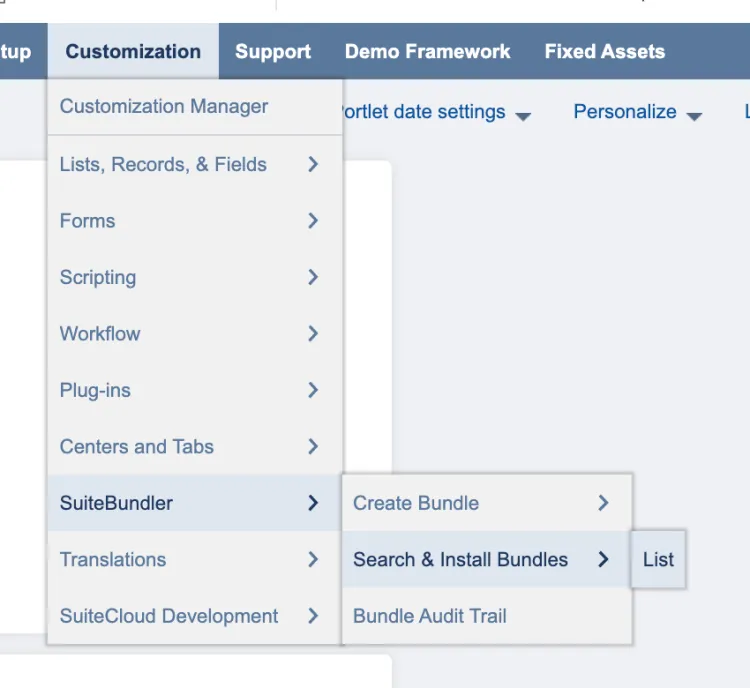
Go to Search & Install Bundles List
Step 2: Update Bundle
Find the Citizens bundle from the list. Then, hover over the green icon and select Update.
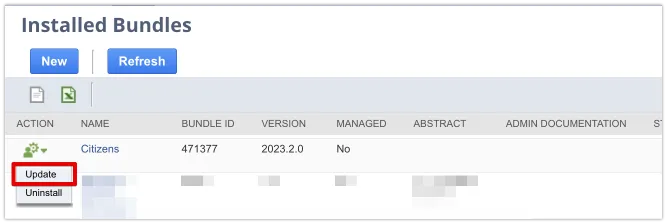
Select Update Bundle, and select OK on the confirmation pop-up.

Update Bundle
The bundle will take a few moments to update – it will appear as pending and then show the progress of the update. Once complete, the status column on the Installed Bundles page will show a check mark.