Domestic Wire Requirements
Domestic US Wires are payments used to move funds within the US. All transfers must be in USD.
For NetSuite users, the Entity Bank Details bundle is required to process Domestic US Wire payments through the plugin.
Key Terms
Below are some key terms to help you navigate the instructions and setup for Domestic US payments more easily.
Term | Definition |
|---|---|
SWIFT/BIC Code | A Bank Identifier Code (BIC), also known as a SWIFT code, is an 8-to-11-character alphanumeric code that uniquely identifies financial institutions. Note: If the BIC is unavailable, you must provide the bank's full name and address instead. |
Vendor and Bill Requirements
To prevent payment delays or returns, all payments are required to have the following three requirements:
Vendor Record
The Entity's full name, address, and phone number must be accurately populated on the Vendor record.
Billing Address and Location
The Entity and Bill (if applicable) Billing Addresses must be located in the country of destination and must match the country specified in the Entity Bank Details record.
Currency
The currency for the Vendor Bill must be in USD.
Payment Requirements
Payment Context
- Swift BIC Country Code: US
- Method: Domestic
- Country: United States
- Currency: USD
Requirements
Routing Number is mandatory.
Account Number is mandatory.
Payer Account Number must be between 6 and 10 digits.
Destination Account Number can be up to 12 digits.
Domestic Wire Cutoff Time
The cut-off time for same-day processing in the U.S. Domestic Wires is 5:30 pm ET.
However, if transactions are submitted after that time, FISPAN will still send them, and Wells Fargo will handle the processing on their end.
NetSuite Specific Requirements
The information below pertains to US/USD wire payments for NetSuite users only.
NetSuite Vendor Requirements
To ensure successful transmission, the following fields must be populated correctly on the Vendor record.
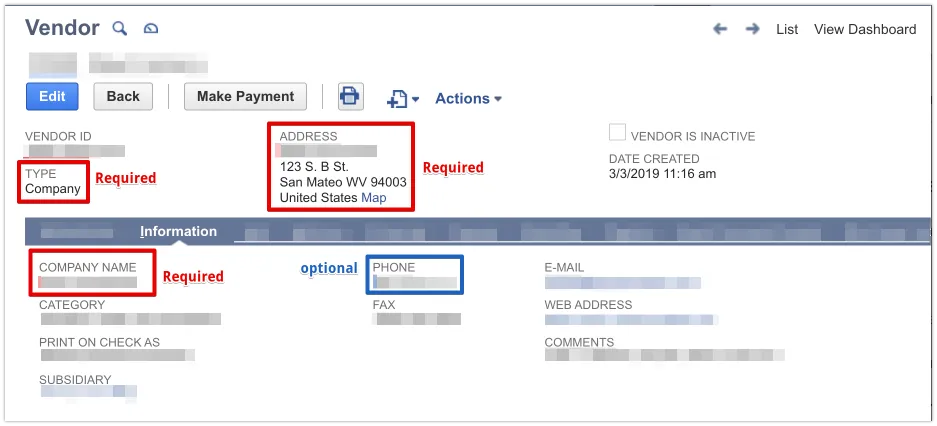
- Company Name: Maximum 140 characters.
- Type: Must be designated as Company or Individual.
- Address: A valid US address is required.
- Do not use the Override feature, as this can interfere with extracting accurate address information.
- Phone Number: Optional.
NOTE: The Print on Check As field acts as the Vendor name when filled. This is the beneficiary name used for all transmitted remittances.
NetSuite Vendor Bank Account Requirements
NetSuite users must install the Entity Bank Details bundle to process domestic wire payments via the plugin. For more information on this bundle, use the left-hand menu to navigate to NetSuite Plugin Setup.
Once installed, navigate to the Entity Bank Details tab on the Vendor record and ensure the following:
- Method: Domestic
- Country: United States
- Currency: USD
- Type of Accounts: Default is Checking.
- Account Number: Expected to be between 5 and 18 digits.
- Routing Number: Exactly 9 digits
- BIC Code: Exactly 8 or 11 characters
NetSuite Bill Requirements
Before processing a payment, ensure all NetSuite bills are in an OPEN state, marked as Approved, and satisfy these specific requirements:
- State: OPEN
- Approval Status: Approved
- Billing Address: Must be a US address, and the Override toggle must be unchecked on the bill.
- Currency: USD
- Reference No.: Maximum 30 characters
- Memo: Maximum 140 characters, if provided.