Release Notes (QBO)
2026
NOTE: These updates are part of our November 2026 release. While you may see these features documented in our guides earlier, please note that all changes will officially go live on November 18, 2026.
November 2026
Improvements
Empty-state messages, such as “Way to Go! No bills pending payment” and “No results found,” now stay centred in your tables, whether the filter panel is open or closed. The result is a more balanced, polished view across all tables with filters.
Also, we've made improvements to the Payments table:
- Optimized Column Layout: The Payments table now fits more columns on screen with tighter spacing and narrower amount columns. To Pay and Payment Method no longer stay fixed to the right edge and can be reordered like any other column.
- Credits Applied Is Now Credits Used: The Credits Applied column has been renamed to Credits Used.
October 2026
Improvements
Table headers now remain fixed in view while scrolling through long lists on the Bank Accounts page, allowing you to reference column labels without returning to the top of the page.
September 2026
Improvements
We've made a series of enhancements across the plugin to improve usability and visual clarity:
- Refined payment Action Log layout: The Action Log timeline now displays with correct alignment, spacing, and styling, making it easier to track payment statuses at a glance.
- Table headers now stay visible as you scroll: Table headers now remain fixed in view while scrolling through long lists on the Accounts Payable, History, Positive Pay and Vendors pages, allowing you to reference column labels without returning to the top of the page.
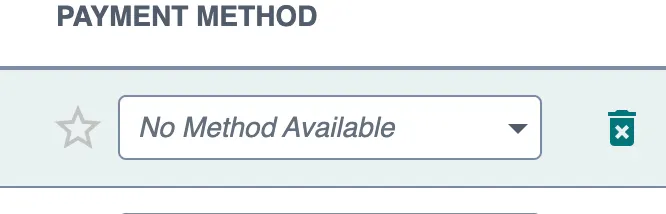
- Clearer labeling when no payment methods are available: Payment method fields now display "No Method Available" when a vendor or employee has no configured payment methods, clearly indicating that no selection can be made. This applies across all payment method fields and drop-downs.
- Improved guidance for setting up approval workflows: The TD Bank plugin now offers clearer direction when approval rules have not yet been configured, distinguishing between rules that still need to be set up and an empty approval queue. When approval rules aren't yet in place in the FISPAN Portal, users see a helpful "Approval Rules Required" screen with direct links to the configuration area, guiding them to complete setup before processing payment or vendor approvals.
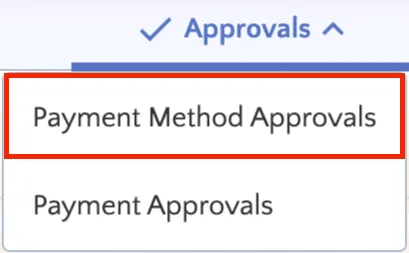
- Clearer labeling for vendor change reviews: The "Vendor Accounts" section under Approvals is now labeled "Payment Method Approvals" to clearly indicate that pending updates relate specifically to vendor payment methods and bank details. This is a naming change only and does not affect existing permissions or pending requests.
NOTE: These updates are part of our August 2026 release. While you may see these features documented in our guides earlier, please note that all changes will officially go live on August 12, 2026.
August 2026
New Features Added
We're excited to introduce Payment Method Approvals (QBO), designed to strengthen fraud prevention and internal controls around vendor payment information. Now you can require review and approval before sensitive vendor changes, such as bank account updates, address modifications, and email changes, take effect in your payment workflows.
To access this feature, please reach out to your Bank Representative.
Improvements
FISPAN Sync now maintains seamless tab alignment across all display scaling and browser zoom levels, including magnification up to 200%. This update ensures a smooth, consistent navigation experience and improved accessibility for users who rely on higher screen zoom settings.
July 2026
New Features Added
We're pleased to announce that Payment Approvals (QBO) is now available for QuickBooks Online FISPAN Sync. This feature integrates a secure, multi-tiered payment approval workflow directly into your FISPAN Sync dashboard, giving your organization greater control over outgoing payments.
We’re also excited to introduce the Positive Pay (QBO) feature, designed to enhance the security and efficiency of your check payment process. Now you can quickly and safely send detailed check files directly to your bank, reducing fraud risk and simplifying your payment workflows.
To access this feature, please reach out to your Bank Representative.
Improvements
We've added a dedicated Bill Number column to the Pay Bill page. Bills synced from QuickBooks Online now display the exact QuickBooks "Bill no." on each record, making it faster and easier to match your records.
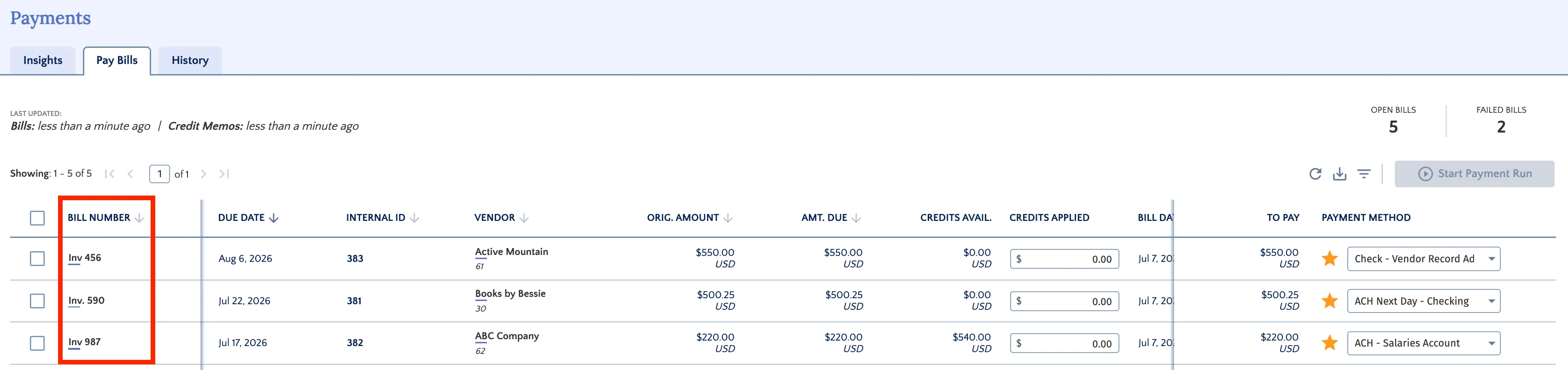
Also, the Pay Bills page now displays the invoice memo directly from QuickBooks Online, positioned before the Invoice Date.
June 2026
New Feature
QuickBooks Online FISPAN Sync now includes enhanced user-level permission controls that provide more granular access management for administrators. The system enforces role-based permissions, ensuring that users only see and can interact with features and data appropriate to their assigned roles.
Improved Feature
Following a one-month preview period, our upgraded interface is now the default experience for all users, and the legacy interface has been retired. Simply log in to start using the upgraded features.
May 2026
Enhanced Features
As part of our commitment to continue delivering a better user experience, we are introducing an enhanced version of the QuickBooks Online FISPAN Sync plugin with an updated interface, better performance, and expanded features.
This release is available as an opt-in experience, giving you early access to explore the new look and functionality before the full rollout.
The previous interface will remain accessible and supported until it is officially retired on June 10, 2026.
April
Improvements
As part of our commitment to delivering a modern, reliable, and scalable plugin, we are excited to announce a significant upgrade to your integration experience through a new and improved user interface: QuickBooks Online FISPAN Sync.
This evolution is designed to streamline your workflow and provide a more intuitive way to manage your business needs. Clients require no action to receive this update; upon your next login, you will automatically see the new interface.
2025
November
Improvements
We’ve enhanced the display of transaction descriptions to ensure better readability and alignment across the Balances and Transactions page. Long descriptions are now automatically truncated with an ellipsis (…) and display the full text on hover for a smoother user experience.