Release Notes (NetSuite)
The NetSuite plugin releases updates to the ERP bundle with new fixes, features, and improvements. To learn how to update your bundle, visit: Updating the SuiteApp (NetSuite)
2026
NOTE: These updates are part of our October 2026 release. While you may see these features documented in our guides earlier, please note that all changes will officially go live on October 14, 2026.
October 2026
New Features Added
We're excited to announce support for Scheduled Payments (NetSuite) within the Payables (Beta) page. You can now select a future date for payments, giving you greater control and flexibility in managing your payment workflow.
Bug Fixes
We fixed an issue where exporting Payment Approvals history with a date range filter failed with an error. Filtered exports now generate files as expected.
September 2026
Improvements
MUFG Connect now offers clearer direction when approval rules have not yet been configured, distinguishing between rules that still need to be set up and an empty approval queue. When approval rules aren't yet in place in the FISPAN Portal, users see a helpful "Approval Rules Required" screen with direct links to the configuration area, guiding them to complete setup before processing payment or vendor approvals.
We’ve refined the plugin layout for the NetSuite Redwood Experience. Pages now display with consistent padding, spacing, and alignment across the Classic, Redwood, and NetSuite Next experiences.
August 2026
July 2026
New Features Added
We're pleased to announce that Payment Approvals (NetSuite) is now available for the plugin. This feature integrates a secure, multi-tiered payment approval workflow directly into your ERP, giving your organization greater control over outgoing payments.
Feature Improvements
We are excited to announce a streamlined UI refresh and enhanced data visibility for our clients. This update focuses on better organization for diverse account types and improved transaction tracking.
The page you know as Balances and Transactions is evolving. To support our expanding ecosystem of account types, we have rebranded this space to Bank Accounts. This new UI provides a cleaner foundation for managing multiple financial streams in one place.
IMPORTANT: Action Required for Bank Account Permissions
Upgrading to this release replaces the previous Balances & Transactions (B&T) page. After updating, all users will temporarily lose access until permissions are re-granted.
To restore access, administrators must:
- Grant users permission to the new Bank Accounts page.
- Assign the appropriate ERP permissions within the new Bank Accounts page settings.
For more information, please refer to our Product Guide: Managing Bank Accounts (NetSuite)
Improvements
We've added an automated workflow step to our onboarding wizard. New users will see one additional step during initial setup:
- Step 12: Enable Bank Feeds: Seamlessly connect your bank accounts during setup to automatically sync transactions directly into your ERP, eliminating manual data entry.
NOTE: This step only applies to users going through onboarding for the first time.
June 2026
New Features Added
We're excited to introduce the Sandbox Checklist via the Portal, a guided, self-serve onboarding experience built directly in the FISPAN Portal to help clients get the most out of their Sandbox environment. The Sandbox Checklist is a structured list of post-onboarding sandbox checklist that guides clients through the plugin. This allows them to gain immediate clarity on the next steps once they are onboarding. It eliminates the guesswork by giving clients a clear, prioritized path through FISPAN's core capabilities, at their own pace.
Also, Product Assistant is now available on the Payment Approvals pages. Product Assistant uses AI to instantly cross-reference your questions with our Product Guide, delivering real-time answers and direct links to the relevant documentation. It searches publicly available Product Guide content and provides trusted guidance, feature explanations, and links to source documentation directly in the experience. Product Assistant is a guidance tool only and does not make changes in the ERP or plugin.
Improvements
We are excited to announce a streamlined UI refresh and enhanced data visibility for our clients. This update focuses on better organization for diverse account types and improved transaction tracking.
The page you know as Balances and Transactions is evolving. To support our expanding ecosystem of account types, we have rebranded this space to Bank Accounts. This new UI provides a cleaner foundation for managing multiple financial streams in one place.
For more information, please refer to our Product Guide: Managing Bank Accounts (NetSuite)
We’ve also enhanced the plugin experience with a refined user interface designed to create a more seamless and consistent experience across systems. Driven by customer feedback, these enhancements improve usability and navigation, seamlessly matching the native NetSuite interface, while maintaining the workflows users know today. This release includes visual updates only; no functionality or processes have changed.
May 2026
Improvements
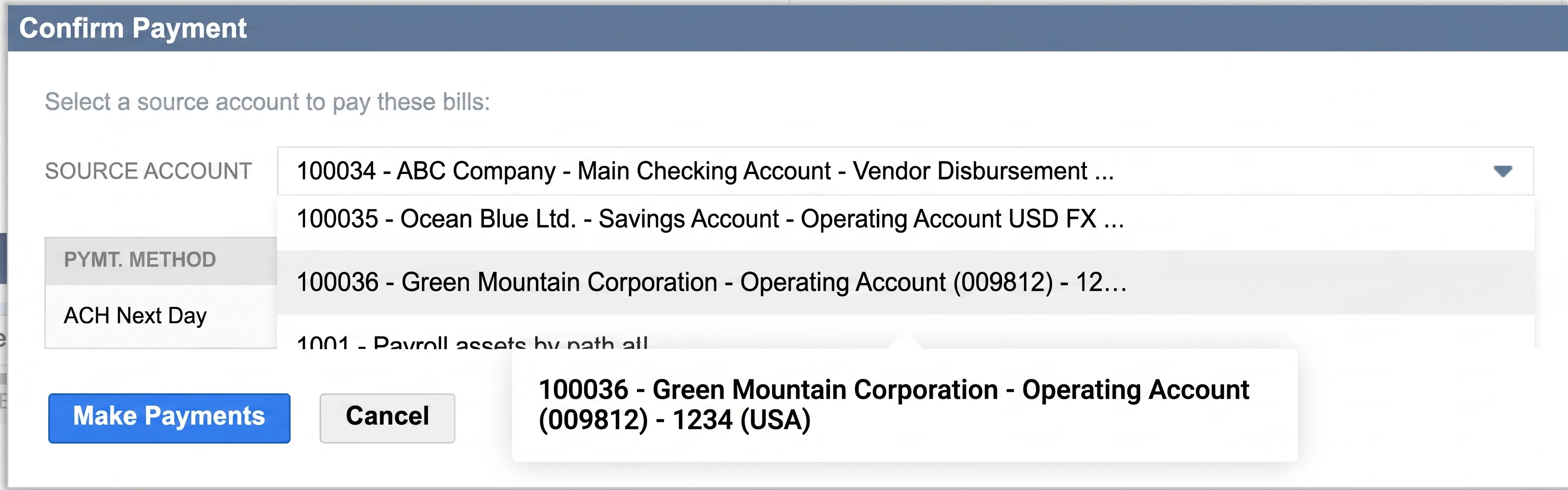
We’ve fixed a display issue on the Pay Bills page where tooltips for bank accounts with long names weren't appearing correctly in the Confirm Payment pop-up. Now, when you hover over a truncated name, the full account title displays clearly, allowing you to verify your payment details with total confidence before submitting.
April 2026
Updates
We have enhanced our Bank Feeds integration to fully support the new custom scheduling and transaction import features in NetSuite's 2026.1 release. During initial account setup, you can now independently select a custom start date to automatically sync up to 60 days of historical transactions. This update eliminates our previous "tomorrow onwards" restriction, meaning you no longer need to contact Support to backfill past data. Additionally, our service seamlessly responds to NetSuite's new custom scheduling, ensuring your data imports exactly when you need it. For clients still operating on NetSuite 2025.2, our system will automatically sync up to the last 60 days of historical data by default upon connecting.