BACS Requirements
BACS payments are used to move funds within the United Kingdom. All transfers must be in GBP.
For NetSuite users, the Entity Bank Details bundle is required to process BACS payments through the plugin.
Key Terms
Below are some key terms to help you navigate the instructions and setup for BACS payments more easily.
Term | Definition |
|---|---|
International Bank Account Number (IBAN) | A standard international numbering system developed to identify an individual’s account at a financial institution. The structure consists of a two-letter country code, followed by two digits and up to 30 alphanumeric characters. |
SWIFT/BIC Code | A Bank Identifier Code (BIC), also known as a SWIFT code, is an 8-to-11-character alphanumeric code that uniquely identifies financial institutions. Note: If the BIC is unavailable, you must provide the bank's full name and address instead. |
Sort Code | Also known as the Local Branch Code, this is a 6-digit numeric code used as a unique identifier for financial institutions. This code is used for banks within the United Kingdom and Ireland. |
Vendor and Bill Requirements
To prevent payment delays or returns, all payments are required to have the following requirements:
Vendor Record
The Entity's full name and address must be accurately populated on the Vendor record.
Billing Address and Location
The Entity and Bill (if applicable) Billing Addresses must be located in the country of destination and must match the country specified in the Entity Bank Details record.
Payment Requirements
Payment Context
- Swift BIC Country Code: GB
- Method: Domestic
- Country: United Kingdom
- Currency: GBP
Requirements
You can utilize two methods to meet the requirements of a BACS Payment:
Provide IBAN (required) and the BIC Code (recommended)
Provide non-IBAN account number and the Sort Code
All BACS payments must have a source account located within the UK and have a currency of GBP.
NetSuite Vendor Record Requirements
The following fields must be accurately populated on the Vendor record in NetSuite.
- Company Name: Max 140 characters
- Type: Company or Individual
- Address: Must be a valid GB Address
IMPORTANT: Do not use the Override feature on the address, as it can interfere with the extraction of accurate address information.
- Phone Number: Optional
- Print on Check As: Optional
The Company Name, Type, and Address of the vendor are required. This information lives on the Vendor record and resides in default fields as part of the base NetSuite.
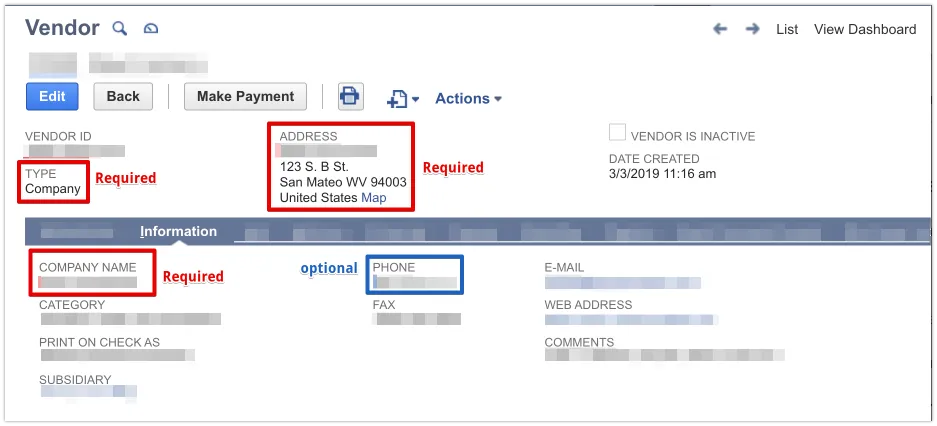
NOTE: Print on Check As will be used as the vendor name when populated. This is the beneficiary's name that will be transmitted in any remittance.
NetSuite Vendor Bank Account Requirements
For NetSuite users, the Entity Bank Details bundle is required to process ACH payments through the plugin. To learn more about this bundle, use the menu on the left to navigate to the NetSuite Plugin Setup.
Once installed, this bundle can be accessed via the Vendor record under the tab Entity Bank Details.
The following fields must be accurately populated:
- Method: Domestic
- Country: United Kingdom
- Currency: GBP
- Type of Accounts: Default is Checking
You can use one of two methods to meet the requirements of a BACS Payment:
- Provide IBAN (required) and the BIC Code (recommended), or
- Provide a non-IBAN account number and the Sort Code
NetSuite Bill Requirements
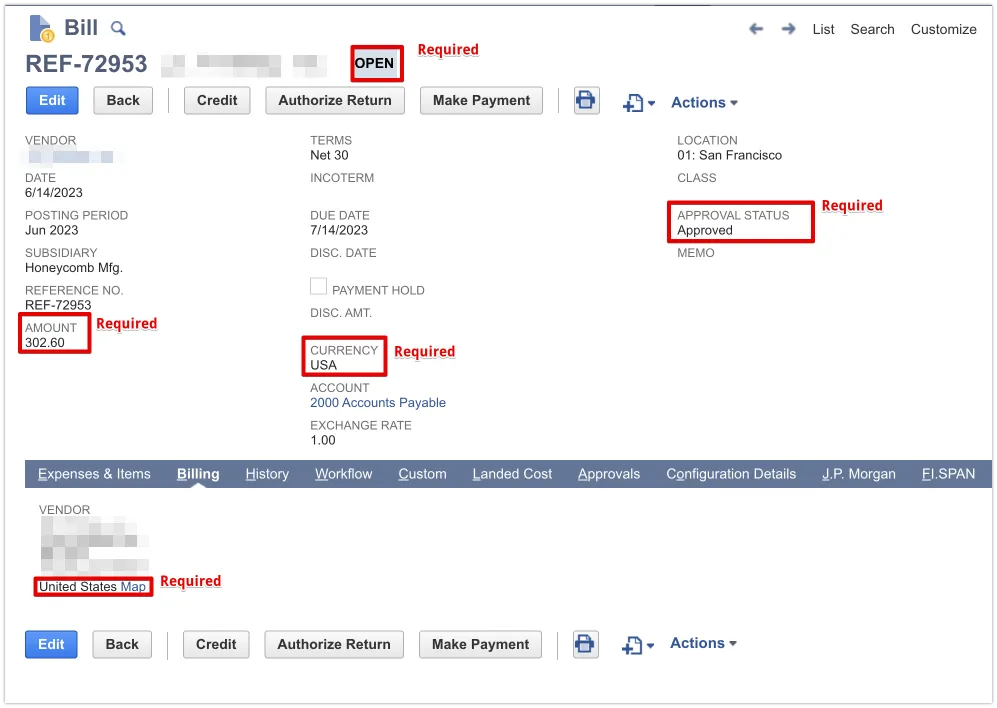
In order to be eligible for payment, NetSuite bills must be in an OPEN state and marked as Approved.
The following fields must be accurately populated:
- State: OPEN
- Approval Status: Approved
- For BACS payments, the billing address must be in GB, and the Override toggle may not be checked for the address on the bill.
- For BACS payments, only bills in GBP are acceptable.
- The Reference No. must be no greater than 30 characters.
- The Memo must be no greater than 140 characters, if provided.