Step 13: Plugin Access Management
NetSuite Script Deployments
The Administrator has full access to view all plugin pages. In order to allow access to other users and departments, follow these steps:
Select Customization → Scripting → Script Deployments. Use the following filters:
- On the Type dropdown select Suitelet
- On the API Version dropdown select 2.1.
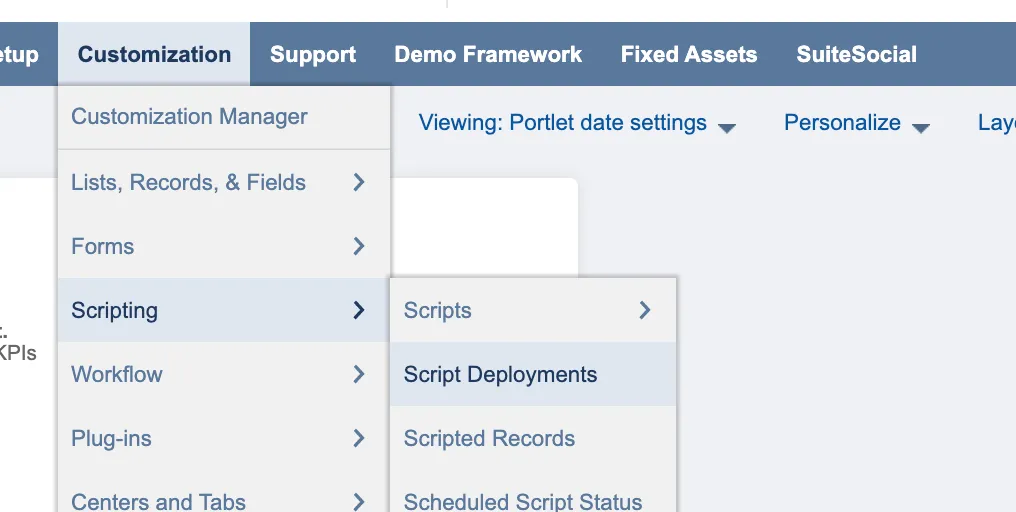
Each of the Suitelets listed corresponds to a subtab under HSBC Integrator. Click Edit on each of the following script deployment Suitelets you wish to edit:
- HSBC Integrator Bank Accounts
- HSBC Integrator Pay Vendor Bills
- HSBC Integrator Payments History
- HSBC Integrator Trans Feed Config (Connectivity Method field used in Bank Feeds setup)
- HSBC Integrator User Customization (Customize columns)
Add employee roles by selecting the appropriate employee, department, and role you would like to assign. Then, click Save.

NOTE: If you're using Accounts Payable and adding new users, confirm they have the correct permissions to access the Entity Bank Details tab and its information.
If this is your first time installing the plugin and you've already installed the Entity Bank Details bundle, or if you're adding new users, use the following link to edit role permissions for the associated Entity Bank Details Suitelet, RESTlet, and User Event script deployments:
Or if this is the initial installation, you can wait to install and configure the Entity Bank Details bundle later as described in: