Step 13: Plugin Access Management
NetSuite Script Deployments
The Administrator has full access to view all plugin pages. In order to allow access to other users and departments, follow these steps:
Select Customization → Scripting → Script Deployments. Use the following filters:
- On the Type dropdown select Suitelet
- On the API Version dropdown select 2.1.
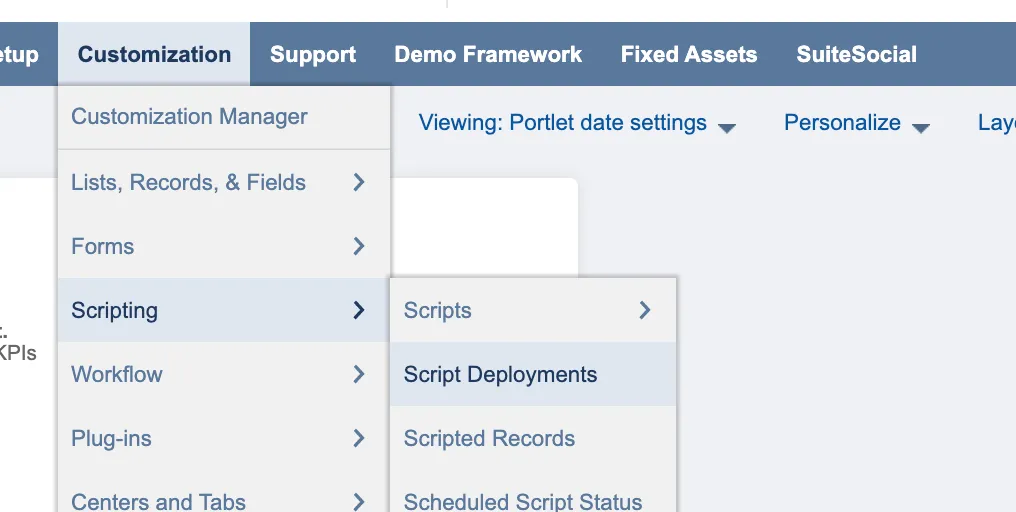
Go to Script Deployments
Each of the Suitelets listed corresponds to a subtab under the Citizens tab. Select Edit on each of the following script deployment Suitelets you wish to edit:
- Citizens Bank Accounts (Reporting)
- Citizens Payments (Payables)
- Citizens Payment Methods (Payables)
- Citizens Expense Reimbursements (Payables)
- Citizens Pymt Method Approvals
- Citizens Payment Approvals
- Citizens Trans Feed Config
- Citizens Transfer History (Accounts to Account Transfers History)
- Citizens Transfer Funds (Account to Account Transfers)
- Citizens Trans Checks History (Positive Pay History)
- Citizens Trans Checks (Positive Pay)
Add employee roles by selecting the appropriate, employee, department and role you would like to assign. Then, select Save.

📋 Granting Access to Legacy Payment Module If you need to grant users access to the old Vendor Bills or Expense Reports module, also grant access to these additional scripts:
- Citizens Payments History
- Citizens Pay Vendor Bills
- Citizens Pay Expense Reports
- CitizensUser Customization
Note: New installations will not see these legacy scripts.