Step 9: Creating a New Security Token
An access token from NetSuite is needed to proceed with the installation. Follow these steps to create a new security token in NetSuite and add it to the installation wizard.
Create a New Security Token
Navigate to Manage Access Tokens
In NetSuite, navigate to the homepage.
Find Settings and select Manage Access Tokens.
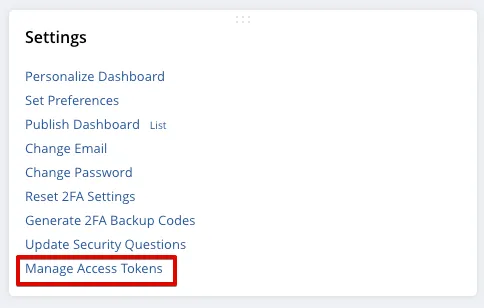
Where the Settings are located differs depending on how you have arranged content on your homepage. By default, it is found on the bottom left of the page.
Add New My Access Token
On the My Access Tokens page, select the New My Access Token button.

On the Access Tokens page, the application must be defined using the Application Name dropdown. The application for your bank plugin was created automatically when the plugin was installed.
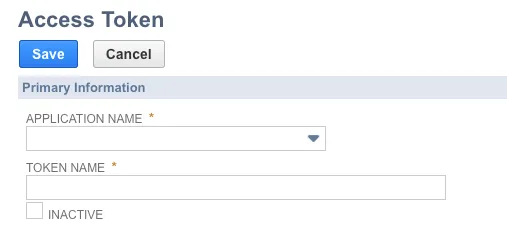
Generate Token
Select BMO Integration in the Application Name box and click Save.
Once you click Save, the loaded page will show a Token Key and a Token Secret. Copy and paste the Token ID and Token Secret to the appropriate box in the installation wizard.
Once complete, select Next Step.

IMPORTANT: The access token created during this step is tied to the NetSuite Administrator who generated it. If this user's Administrator credentials are ever revoked (i.e. either by losing administrator access or leaving the company), the token will become VOID, and the plugin will stop working.
To avoid any service disruption, you must create a new token:
- Log in to https://sys.fispan.live/
- Deactivate the existing NetSuite connection.
- Reactivate the connection and go through the installation wizard again.
This will generate a new access token that will replace the voided Token ID and Token Secret.
If you encounter any issues with this process or if you do not have a login for the link provided above, please reach out to support for assistance.
IMPORTANT: To ensure your bank plugin is set up correctly, you need to understand the minimum required permissions and user roles. Following the recommended method for managing access tokens is crucial to preventing service disruptions.
Please refer to Minimum Permissions (NetSuite)minim for the full list of required permissions and step-by-step guidance.