NOTE: These updates are part of our October 2026 release. While you may see these features documented in our guides earlier, please note that all changes will officially go live on October 14, 2026.
October 2026
2026.10.0 - October 14, 2026
Improved
Bank Accounts page enhancements.
Fixed
Resolved an issue with exporting approval history using a date filter.
Feature Improvements
We are excited to announce a streamlined UI refresh and enhanced data visibility for our clients. This update focuses on better organization for diverse account types and improved transaction tracking.
The page you know as Balances and Transactions is evolving. To support our expanding ecosystem of account types, we have rebranded this space to Bank Accounts. This new UI provides a cleaner foundation for managing multiple financial streams in one place.
NOTE: No action is required. Users who had access to the Balances and Transactions page will automatically have access to the new Bank Accounts page after updating.
To help you identify partners and sources faster, we’ve added a Counterparty Name column to the Transactions model.
NOTE: This column will appear blank as we are working on extracting out this information.
2
Dedicated Deposit Account Tabs
Organization just got easier. Use the new Deposit Account Type tab to instantly access all information related to your checking and savings accounts, keeping them organized all in one place.
3
Enhanced Filtering & Search
Stop digging through rows of data. You can now perform targeted searches and filter your views by:
Bank Reference
Customer Reference
Amount
Description
Post Date
4
Visual UI Refresh & Country Identifiers
We’ve added Country Images (flags/identifiers) to the account interface. This allows you to spot the geographic source of funds and account origins at a single glance, providing better global context for your Treasury team.
5
Seamless Access After Update
Existing user access carries over automatically when you update the plugin. Administrators can still grant or revoke access to the Bank Accounts page at any time.
Bug Fixes
We fixed an issue where exporting Payment Approvals history with a date range filter failed with an error. Filtered exports now generate files as expected.
September 2026
2026.9.0 - September 16, 2026
Improved
Enhanced payee name for Positive Pay files.
Improvements
We've improved Positive Pay file generation to ensure payee names match your printed checks seamlessly. The system now reliably prioritizes custom check payee details, such as "Print on Check As," ensuring accurate vendor information, smoother bank processing, and a more streamlined payment workflow.
August 2026
2026.8.0 - August 12, 2026
Improved
General improvements and bug fixes.
July 2026
2026.7.0 - July 15, 2026
Improved
Enhanced onboarding wizard.
Improvements
We've updated our onboarding wizard with new setup steps for automated workflows and approvals.
New users will now see two additional steps during initial setup:
Step 11: Set Up Approval Rules: Configure and customize your payment approval workflows during onboarding to ensure compliance and control from day one.
Step 12: Enable Bank Feeds: Seamlessly connect your bank accounts during setup to automatically sync transactions directly into your ERP, eliminating manual data entry.
NOTE: These new steps apply exclusively to new users going through the onboarding process for the very first time.
June 2026
2026.6.3 - June 25, 2026
Fixed
Addressed and resolved a minor deployment issue.
2026.6.0 - June 10, 2026
Added
Introducing Sandbox Checklist.
Improved
Enhanced NetSuite-themed experience.
New Features Added
We're excited to introduce the Sandbox Checklist via the PortalSandbox Checklist via the Portal, a guided, self-serve onboarding experience built directly in the FISPAN Portal to help clients get the most out of their Sandbox environment. The Sandbox Checklist is a structured list of post-onboarding sandbox checklist that guides clients through the plugin. This allows them to gain immediate clarity on the next steps once they are onboarding. It eliminates the guesswork by giving clients a clear, prioritized path through FISPAN's core capabilities, at their own pace.
1
My Journey Tab
A new My Journey tab now appears in the Vantage Connect Portal once the onboarding wizard has been completed. This allows for tracking progress through your Sandbox. It remains up to date as you explore the plugin.
2
Automated Task Completion
As you perform actions in their ERP, such as loading bills, viewing transactions, or confirming a payment, the sandbox checklist will mark those tasks as complete upon the next refresh.
3
Tailored to Your Bank’s Products
The checklist only displays tasks relevant to the products enabled for you.
4
Learn More Redirect
The Sandbox Checklist includes a Learn More link that takes you directly to the relevant section of our Product Guide or Interactive Demo, providing step-by-step guidance exactly when and where it's needed.
Improvements
We’ve enhanced the plugin experience with a refined user interface designed to create a more seamless and consistent experience across systems. Driven by customer feedback, these enhancements improve usability and navigation, seamlessly matching the native NetSuite interface,while maintaining the workflows users know today. This release includes visual updates only; no functionality or processes have changed.
May 2026
2026.5.3 - May 15, 2026
Fixed
Minor system updates to ensure seamless payment approvals.
2026.5.0 - May 13, 2026
Fixed
Enhance bank account name tooltips on the Pay Bills page.
Improvements
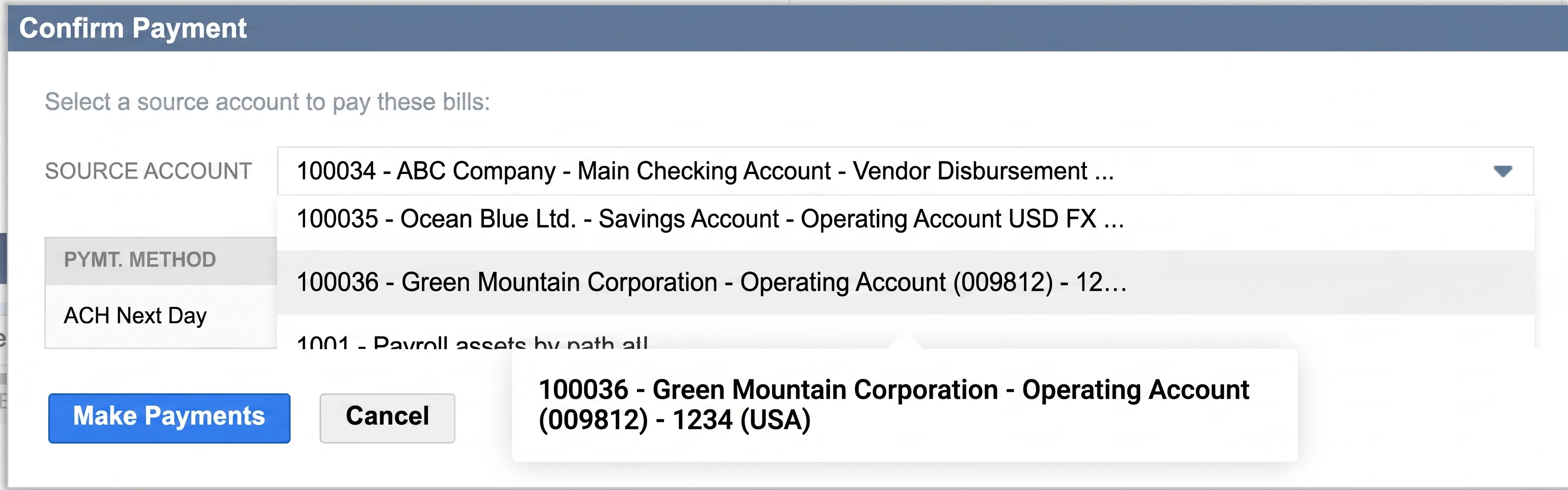
We’ve fixed a display issue on the Pay Bills page where tooltips for bank accounts with long names weren't appearing correctly in the Confirm Payment pop-up. Now, when you hover over a truncated name, the full account title displays clearly, allowing you to verify your payment details with total confidence before submitting.
Confirm Payment Pop-up
April 2026
Note: These updates are part of our April 2026 release. While you may see these features documented in our guides earlier, please note that all changes will officially go live on April 15, 2026.
2026.4.0 - April 15, 2026
Improved
Bank Feeds Update for NetSuite 2026.1.
Updates
We have enhanced our Bank Feeds integration to fully support the new custom scheduling and transaction import features in NetSuite's 2026.1 release. During initial account setup, you can now independently select a custom start date to automatically sync up to 60 days of historical transactions. This update eliminates our previous "tomorrow onwards" restriction, meaning you no longer need to contact Support to backfill past data. Additionally, our service seamlessly responds to NetSuite's new custom scheduling, ensuring your data imports exactly when you need it. For clients still operating on NetSuite 2025.2, our system will automatically sync up to the last 60 days of historical data by default upon connecting.
March 2026
2026.3.0 - March 11, 2026
Improved
General improvements.
Improvements
General improvements and bug fixes.
2026.2.1 - March 02, 2026
Fixed
Positive Pay subsidiary field update.
February 2026
2026.2.0 - February 11, 2026
Improved
General improvements.
Improvements
General improvements and bug fixes.
January 2026
2026.1.0 - January 14, 2026
Improved
Advanced NetSuite environment insights.
Improvements
To ensure the ongoing stability of our NetSuite integration, we have introduced enhanced performance monitoring. This allows our team to proactively maintain the plugin and resolve technical hurdles before they impact your workflow. By understanding how our plugin performs in your environment, we can optimize stability and ensure a seamless experience for your team.
2025
December 2025
2025.12.1 - December 10, 2025
Added
Check delivery codes are now available.
New Features Added
You are now able to select a check delivery method on a per-vendor basis. This new feature enhances flexibility in vendor payment processes, providing you with greater control and customization options for check payments.
The following options are supported by the plugin:
US regular mail
Return to Client via FedEx Next Day AM
Return to Client via FedEx Next Day PM
Return to Client via FedEx Two Day
Return to Client via FedEx International
FedEx Next Day AM
FedEx Next Day PM
FedEx Two Day
FedEx International
Return to Client UPS Next Day 10:30AM
Return to Client UPS Prepaid Next Day PM
Return to Client UPS Two Day PM
Return to Client via UPS International
UPS Next Day 10:30AM
UPS Prepaid Next Day PM
UPS Two Day PM
UPS International
October 2025
2025.10.0 - October 15, 2025
Improved
We’ve made an improvement to the visibility of bills and transactions that require attention. The "Failed Bills" Tab on the payments page and the "Failed Transactions" Tab on the history page are now displaying all relevant items correctly. This enhancement ensures you have a comprehensive and accurate overview of all bills and transactions that may have previously had a validation issue, allowing for easier tracking and management.
September 2025
2025.9.0 - September 10, 2025
Added
You may now see that the Payment Approvals product is available with your ERP. Please note, this product is currently in a pilot phase. To inquire about being added to the pilot, please reach out directly to your Bank Representative.
August 2025
2025.8.0 - August 13, 2025
Fixed
We've resolved an issue where the payment method labels weren’t displaying correctly in the "Confirm Payment" pop-up. Now, the pop-up accurately reflects the payment method you've selected, ensuring a more consistent payment experience.
Improved
We've improved the clarity of payment cancellation notifications. When a payment cancellation is unsuccessful, the system will now provide more specific and informative messages, helping you understand the reason for the failure. This enhancement ensures you have the necessary details to take appropriate action, leading to a smoother and more efficient payment management workflow.
July 2025
2025.7.0 - July 16, 2025
Improved
We've improved the History Page for clearer payment tracking. The Paid Date now accurately reflects the original payment initiation date and no longer updates with status changes. After the plugin update, only new payments will show their original paid date; previous payments won't be revised.
We've also renamed the Created Date column to Bill Date to precisely indicate when the bill was created, offering a more reliable and intuitive view of your payment history.
June 2025
2025.6.0 - June 11, 2025
Improved
We have renamed all references to BAI Code to Transaction Code in the Balances & Transactions section and the Transaction Details pop-up. This change helps us better support global clients and aligns with industry standards.
Improved
We have updated the Payment Cancellation History page. You'll now see clearer and more distinct labels, providing more precise statuses when reviewing and filtering your payment cancellations.
May 2025
2025.5.3 - May 20, 2025
Fixed
We addressed and resolved the deployment issue.
2025.5.0 - May 14, 2025
Fixed
We fixed an issue on the Positive Pay page where selecting a filter unintentionally applied an additional two-weeks date filter. This automatic default date filter has now been removed. Users can now apply filters without the unexpected addition of a default date range.
Improved
We have improved the Payment Confirmation pop-up to display user-friendly Payment Methods. This change makes the payment initiation process easier to review and understand.
Improved
We have updated how email addresses are used for Virtual Card Payments. The system will now only use the first email address you provide in the dedicated plugin email field for sending payment details. This means the standard/default email field in NetSuite won't be used for sending Virtual Card Payments details.
You'll find this specific field under the Vantage Connect sub-tab on the vendor page, labeled "Vantage Connect Payables Email Address (Only One Email supported)," indicating that only a single email address is supported for Virtual Card Payments.
Added
You may now see the ability to add Wire as a Payment Method under the Vantage Connect sub-tab in your vendor profile. This feature is not yet live for use by clients, however it will be available in the coming months to support your domestic payment needs.
Added
We are excited to announce support for paying Employee Expense Reports through the Vantage℠ Connect plugin in NetSuite. This new feature streamlines the payment process for Employee Expense Reports, enabling clients to make expense reports payments from within their NetSuite environment.
Pay Expense Reports Page
Clients can now access the Expense Reports page by navigating to Vantage Connect Plugin → Payments → Expense Reports. This page allows clients to submit payments for Employee Expense Reports, similar to the existing process for paying Vendor Bills. Only approved Expense Reports will be displayed and available for payment on this page. All payment rails that are available for vendor payments will also be available for expense reports. Employee banking information can be added to the Entity Bank Details bundle to facilitate payments.
Payments History Page
The Payments History page now includes a view of all paid Vendor Bills and Expense Reports. Clients can easily filter between Bills and Expense Reports to find the relevant bills and expense reports.
Added
You may now see the ability to add Check as a Payment Method under the Vantage Connect sub-tab in your vendor profile. This feature is not yet live for use by clients, however it will be available in the coming months to support your domestic payment needs.
For more details on how to access the Expense Reports module, please refer to our Product Guide:
We resolved an issue where certain bills were missing from the Apply Bill Credits pop-up. This update ensures all bills meeting certain criteria are now visible, streamlining the process of applying credits to your vendor bills.
Fixed
Previously, custom date filters were not working on the Pay Vendor Bills page, preventing users from filtering open bills. This has been fixed. You can now use custom date filters on the Pay Vendor Bills page to filter your open bills.
Improved
To ensure consistency, all custom fields have been renamed to align with "Vantage Connect." This change standardizes naming for all fields related to the Vantage Connect plugin.
March 2025
2025.3.0 - March 12, 2025
Fixed
General bug fixes and improvements.
February 2025
2025.2.0 - February 12, 2025
Fixed
General bug fixes and improvements.
January 2025
2025.1.0 - January 15, 2025
Added
We’re excited to introduce a new feature that allows clients to apply bill credits directly from the Pay Vendor Bills page. This enhancement optimizes your payment process, offering greater control, flexibility, and efficiency in managing your accounts payable workflows.
Key Features:
* Real-Time Bill Credit Application: Clients can now apply bill credits in real-time directly from the Pay Vendor Bills page. This streamlines the payment process and enables bill credits to be applied at time of payment.
* Precise Credit Management: The feature allows clients to apply bill credits per currency, per vendor, and across different A/P accounts. This functionality ensures credits are managed effectively according to your specific accounting workflows.
Application Methods: We offer two methods for applying bill credits:
* Auto-Apply: The Auto-Apply function simplifies the process by automatically applying the available bill credits to the open bills, applying available bill credits in order of due date, starting from the oldest moving to the newest.
* Manual Apply: The Manual Apply function allows clients to select specific bill credits and determine the amount to apply to particular bills, giving them precise control over the allocation of bill credits.
This feature works smoothly with bill credits and discounts that are natively applied within the bill.
For more details on how to use the new Bill Credits Application feature, please refer to our Product Guide:
https://support.fispan.com/vantage-connect/applying-bill-credits-during-payment
Added
The discount on the Pay Vendor Bills page is now calculated based on the Original Amount of the bill. This update ensures that the discount calculation is in alignment with standard accounting practices, providing greater accuracy and consistency in your vendor payments.
Fixed
Fixed an issue on the Balances and Transactions page where the "Last Updated" information was not reflecting the correct sync time for intraday and previous day balances. This fix ensures that the "Last Updated" now reflects the correct sync time, ensuring improved visibility to your bank account data.
Fixed
We've resolved an issue in the Confirm Payment pop-up where the bank accounts in the source account drop-down were partially hidden when only one payment method was selected. This fix ensures that the source account drop-down is fully visible and displays all bank accounts, regardless of the number of payment methods selected.
Fixed
We've resolved an issue where the plugin was displaying inconsistent currency formats across pages. This fix ensures that all pages now adhere to the user's preferred currency format, providing consistency and accuracy throughout the plugin.
2024
2024.12.0
December 11, 2024
Fixed
General bug fixes and improvements.
2024.11.0
November 13, 2024
Fixed
Fixed an issue on the Balances and Transactions page where inconsistent date formatting caused the Transaction Details pop-up to break. This fix ensures that clients can now access and view the Transaction Details pop-up.
2024.10.0
October 16, 2024
Improved
The discount on the Pay Vendor Bills page is now calculated based on the Amount Due, aligning with native NetSuite behavior and adhering to standard accounting principles. This update replaces the previous calculation method, which was based on the Original Amount, ensuring more accurate and consistent discount applications across your vendor payments. You will still have the flexibility to modify the calculated discount as needed, streamlining the payment process while enhancing efficiency.
2024.9.0
September 11, 2024
Fixed
Previously, the Amount Due value in the Confirm Payment would be incorrect when one of the bills has discounts or credits applied. This issue has been resolved so that the Amount Due field displays the total original amount due for all selected bills without any discounts or credits applied. The Total to Pay value will reflect the final payment value which may be reduced by credits and discounts.
2024.8.0
August 14, 2024
Improved
The "Balance of Date" field in NetSuite's Match Bank Data module now provides a more accurate date. This update resolves the issue where incorrect dates were returned when an account’s balance information was unavailable.
Added
The Bank Feeds product now has support for an extended list of BAI codes (458 and 158). This change will help minimize the need to manually add transactions with unsupported BAI codes and reduce errors caused when transactions with these codes are pushed into Netsuite.
Fixed
The Balances and Transaction page will now filter out accounts with no balances. The issue causing this functionality to stop working has been resolved.
2024.7.0
July 17, 2024
Added
Bank Feeds parser is renamed to provide clarity to clients as to which parser they are utilizing. FISPAN encourages all clients to migrate to the new Bank Feeds parser. The legacy bank feed parsers will now be named to Wells Fargo Vantage Connect BAI2 Trans Feeds [Old] and Wells Fargo VantageSM Connect CSV Trans Feed [Old]. Clients who utilize the legacy bank feed product or the new bank feed product will have no impact on their current connectivity.
Here is the guideline on migrating bank feeds:
https://support.fispan.com/vantage-connect/migrating-bank-feeds-netsuite
2024.6.0
June 12, 2024
Fixed
Support for 1000+ Bank Accounts on the Balances Page
Fixed an issue on the Balance page where no accounts were displayed for clients with over 2000 accounts. The plugin now shows only the matched accounts from the FISPAN platform, ensuring all relevant accounts are shown.
2024.5.0
May 15, 2024
Added
We've made improvements to the notification system, specifically for updating payment statuses after processing payments from the Pay Bills page. These enhancements ensure that notifications are delivered with greater speed, allowing you to receive important updates promptly.
Fixed
We've resolved an issue where the Last Updated date for bank balances on the Balances and Transactions page didn’t reflect the actual bank sync time. With this fix, the Last Updated date now accurately reflects the latest bank sync time and timestamps are consistent.
Fixed
We've addressed an issue on the Pay Bills page where the Payment Method column sorting wasn't functioning correctly. With this fix, the Payment Method column can be utilized to sort bills accurately.
Fixed
We've resolved an issue where incomplete transactions caused errors when clicking the "View" button on the Transactions page. With this fix, you can now view transaction details even if data is missing and the page will remain functional.
2024.4.0
April 10, 2024
Added
The new Bank Feeds Service has been updated to handle large transaction volumes (1000+) more efficiently, minimizing the risk of timeout errors. This improvement doesn't affect client experience; clients can still pull in transactions as they normally would without any changes. There is no impact to users on the Legacy Bank Feeds.
2024.3.0
March 13, 2024
Added
We're introducing the latest enhancement: the new Bank Feeds product for the Vantage Connect NetSuite bundle!
Key Features and Benefits:
* Easy Setup: Get up and running within minutes! Say goodbye to the time-consuming process of creating a Format Profile for every bank account – you can now map ALL your accounts in a single Format Profile.
* Reduced Duplicate Transaction Risks: Minimize the likelihood of accidentally selecting and importing duplicate transactions.
* Enhanced Transaction Details: Enjoy a richer set of transaction details and increased data availability, ensuring a smoother reconciliation experience.
* Additional Balance Reporting: The Match Bank Data page will now display your bank balance.
To leverage the new Bank Feeds product, follow these steps:
* Update Your Bundle: Ensure you have the latest version of the Vantage Connect bundle installed.
* Setup Guidance: Refer to our setup guide for step-by-step instructions on using the new Bank Feeds product.
https://support.fispan.com/vantage-connect/enabling-bank-feeds
* Need Assistance? Book a guided session with our support team to walk you through the setup process.
Fixed
Implemented a fix where the screen goes blank after clicking “View” on a pending transaction on the Balances & Transactions page. Clicking “View” will now populate the Transaction Details window as expected, but as the transaction is pending most fields will remain empty until they have settled.
Fixed
Leading zeroes for check numbers have been removed from Wells Fargo bank transaction data.
2024.2.0
February 14, 2024
Fixed
General bug fixes and improvements.
2024.1.0
January 17, 2024
Improved
Improvements were made to vendor bills export on the Pay Vendor Bills page so that column headers in the CSV file now align with default column headers on the Pay Vendor Bills page. A future version will include customized columns in the export!