Updating the Plugin (NetSuite)
Step 1: Locate Bundle
Go to Customization → SuiteBundler → Search & Install Bundles → List.
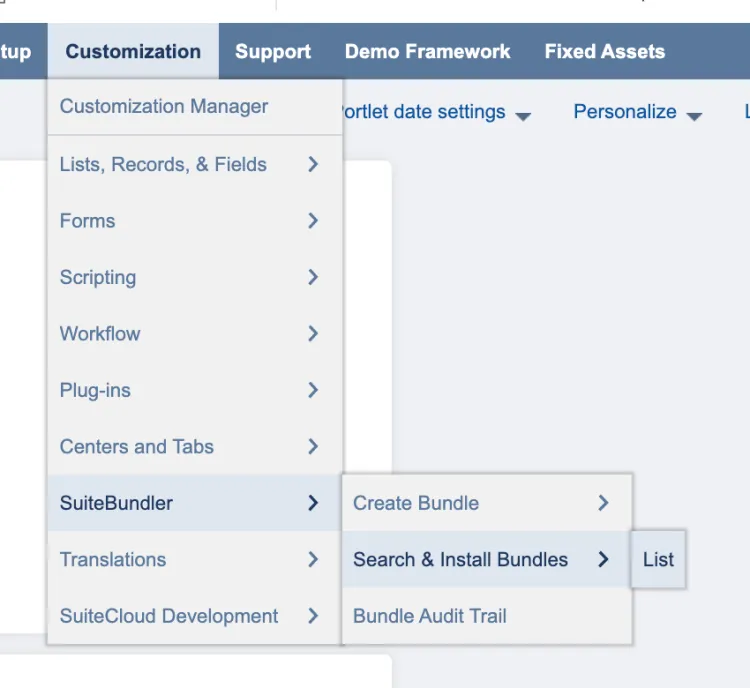
Go to Search & Install Bundles List
Step 2: Update Bundle
Find the Santander Treasury Fusion bundle from the list. Then, hover over the green icon and select Update.
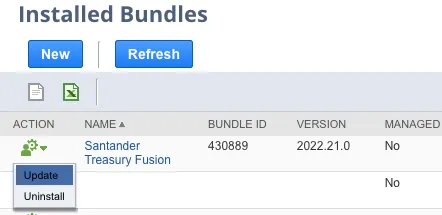
Update Santander Treasury Fusion
Select Update Bundle, and select OK on the confirmation pop-up.

Click Update Bundle
The bundle will take a few moments to update – it will appear as pending and then show the progress of the update. Once complete, the status column on the Installed Bundles page will show a check mark.