Release Notes (NetSuite)
To learn how to update the bundle visit: Updating the Bundle
2026
NOTE: These updates are part of our October 2026 release. While you may see these features documented in our guides earlier, please note that all changes will officially go live on October 14, 2026.
October 2026
Feature Improvements
We are excited to announce a streamlined UI refresh and enhanced data visibility for our clients. This update focuses on better organization for diverse account types and improved transaction tracking.
The page you know as Balances and Transactions is evolving. To support our expanding ecosystem of account types, we have rebranded this space to Bank Accounts. This new UI provides a cleaner foundation for managing multiple financial streams in one place.
NOTE: No action is required. Users who had access to the Balances and Transactions page will automatically have access to the new Bank Accounts page after updating.
For more information, please refer to our Product Guide: Managing Bank Accounts (NetSuite)
September 2026
August 2026
July 2026
Improvements
We've added an automated workflow step to our onboarding wizard. New users will see one additional step during initial setup:
- Step 12: Enable Bank Feeds: Seamlessly connect your bank accounts during setup to automatically sync transactions directly into your ERP, eliminating manual data entry.
NOTE: This step only applies to users going through onboarding for the first time.
June 2026
Improvements
We’ve enhanced the plugin experience with a refined user interface designed to create a more seamless and consistent experience across systems. Driven by customer feedback, these enhancements improve usability and navigation, seamlessly matching the native NetSuite interface, while maintaining the workflows users know today. This release includes visual updates only; no functionality or processes have changed.
May 2026
Improvements
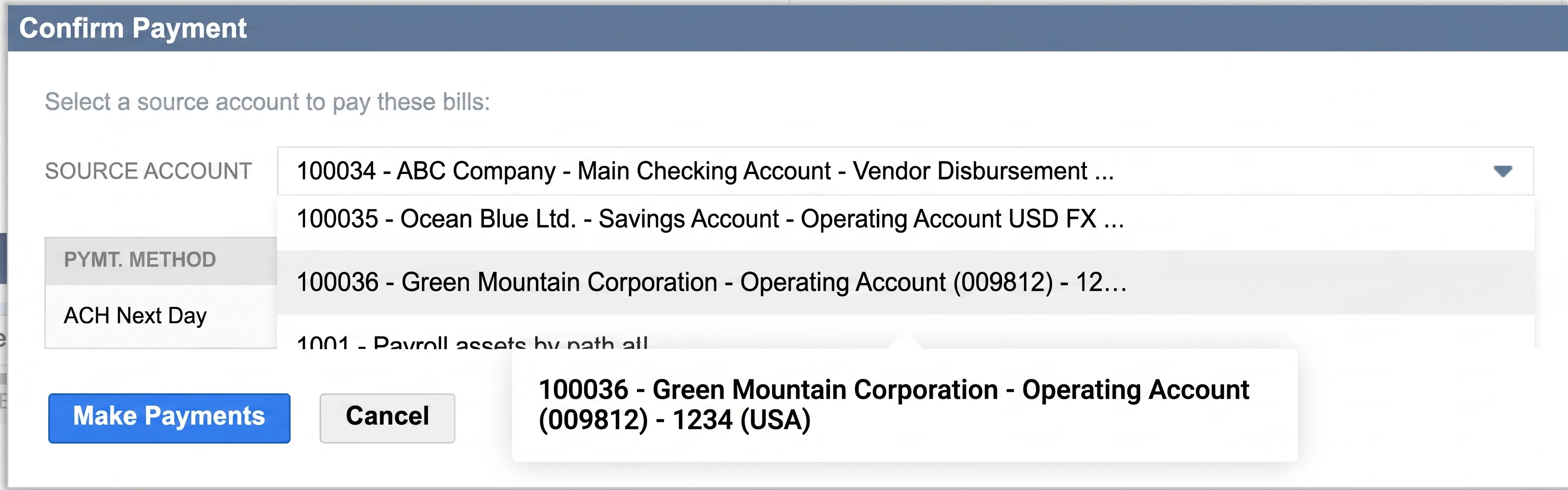
We’ve fixed a display issue on the Pay Bills page where tooltips for bank accounts with long names weren't appearing correctly in the Confirm Payment pop-up. Now, when you hover over a truncated name, the full account title displays clearly, allowing you to verify your payment details with total confidence before submitting.
We've updated the Positive Pay file generation logic for determining the Payee Name. The system will retrieve vendor information in a prioritized order to populate this field. It first pulls from the "Print on Check as" field on the vendor record. If that field is blank, the logic defaults to the Company Name, and finally to the vendor's ID and Full Name.
April 2026
March 2026
February 2026
January 2026
Improvements
To ensure the ongoing stability of our NetSuite integration, we have introduced enhanced performance monitoring. This allows our team to proactively maintain the plugin and resolve technical hurdles before they impact your workflow. By understanding how our plugin performs in your environment, we can optimize stability and ensure a seamless experience for your team.
2025
December 2025
Improvements
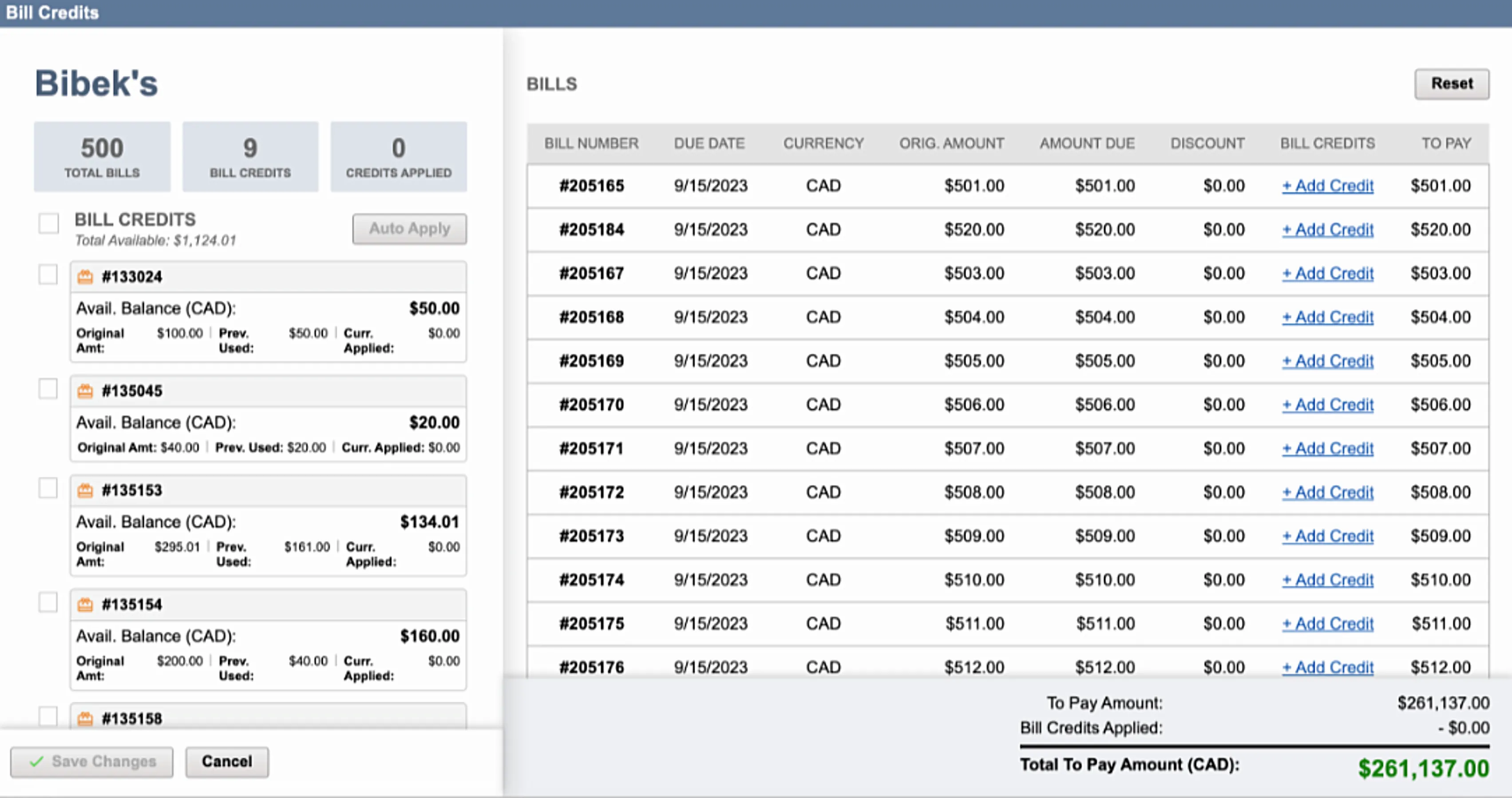
We've enhanced the display of the Bill Credit pop-up for smaller screens. This update ensures optimal screen display and layout consistency across all devices, making the credit application process clearer and more efficient.
November 2025
Bug Fixes
We’ve resolved an issue where payments marked as Completed were not appearing under the Processed Transactions tab. Completed payments now display correctly, ensuring accurate and consistent payment history tracking.
October 2025
September 2025
August 2025
For more information on how to access the Account-to-Account module, please refer to our Product Guide: Book Transfers (NetSuite)
July 2025
June 2025
May 2025
April 2025
March 2025
February 2025
January 2025
2024
2024.12
2024.11
2024.10
2024.9.1
2024.9.0
2024.8.2
2024.8.1
2024.8.0
2024.7.0
2024.6.0
2024.5.1
2024.5.0
2024.4.0
2024.3.0
2024.2.0
2024.1.0
2023
2023.12.0
2023.11.0
2023.10.0
2023.9.1
2023.9.0
2023.8.3
2023.8.2
2023.8.1
2023.8.0
2023.7.2
2023.7.1
2023.7.0
2023.6.0
2023.5.0
2023.4.0
2023.3.0
2023.2.0
2023.1.0
2022
2022.23.0
2022.22.0
2022.21.0