NOTE: These updates are part of our October 2026 release. While you may see these features documented in our guides earlier, please note that all changes will officially go live on October 14, 2026.
October 2026
2026.11 - October 14, 2026
Fixed
Resolved an issue with exporting approval history using a date filter.
Improved
Bank Accounts page permission update.
Bug Fixes
We fixed an issue where exporting Payment Method Approvals history with a date range filter failed with an error. Filtered exports now generate files as expected.
Improvements
With this plugin update, users who previously granted permission to the Bank Accounts page may need to grant it again. If prompted for permission when opening the Bank Accounts page, re-grant access to continue.
September 2026
2026.10 - September 16, 2026
Improved
Clearer labeling for Vendor Record Approvals.
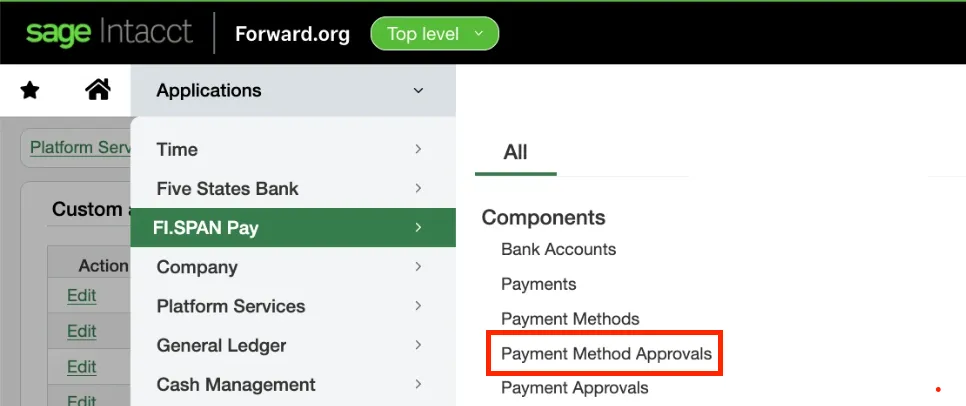
The "Vendor Record Approvals" section under Approvals is now labeled "Payment Method Approvals" to clearly indicate that pending updates relate specifically to vendor payment methods and bank details. This is a naming change only and does not affect existing permissions or pending requests.
"Vendor Record Approvals" is renamed "Payment Method Approvals"
August 2026
2026.9 - August 12, 2026
Improved
Improved bank account validation tooltip display.
Improved
Clearer guidance to the Payment Methods page.
Improvements
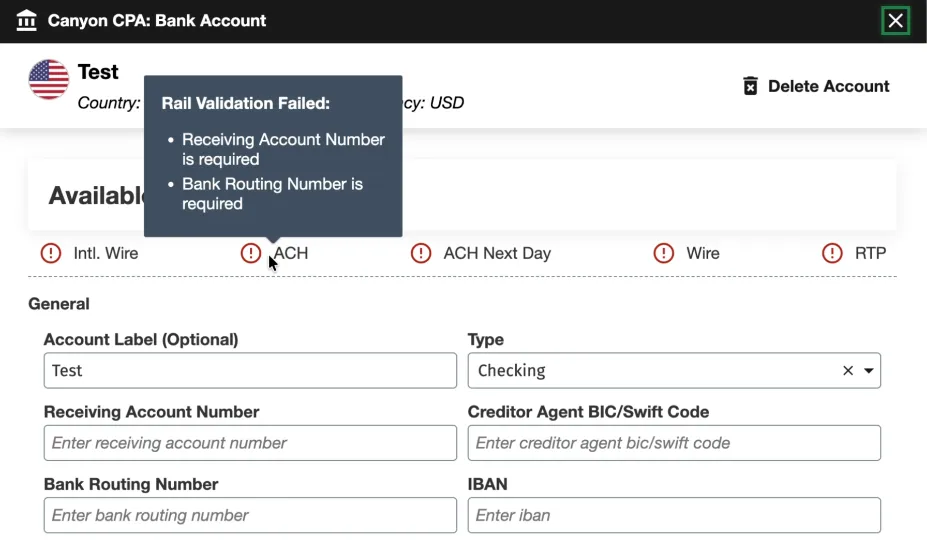
We updated the tooltips in the Bank Account configuration modal so all messages under Available Payment Methods are fully visible, clearly readable, and easy to act on regardless of your screen or modal size.
Bank Account Validation Tooltip Display
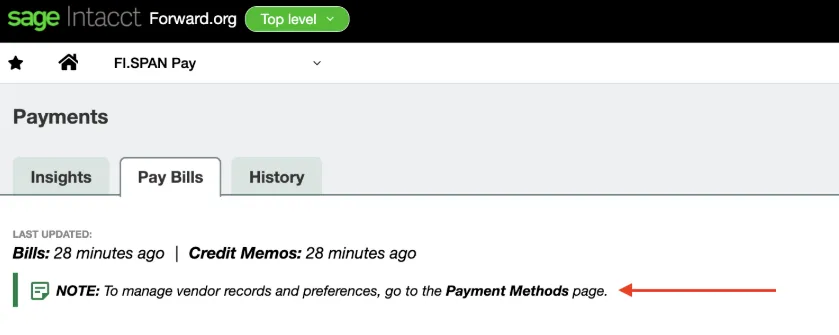
Also, we simplified the note section on the Pay Bills page to make vendor management more straightforward. The updated note provides direct, clear instructions guiding you to the Payment Methods page to manage vendor records and preferences.
Guidance to the Payment Methods Page
July 2026
2026.8 - July 15, 2026
Added
Introducing Payables Insights.
Improved
Enhanced onboarding wizard.
Fixed
Optimized Bill Payment display.
New Features Added
We're excited to launch Payables Insights (Intacct), a centralized, real-time dashboard designed to give your finance team total visibility over your accounts payable, all in one place. The Payables Insights brings your most critical financial metrics into a single, actionable view.
1
Payables Summary
Instantly review outstanding obligations with a consolidated view of overdue, current-week, and total open payables.
2
Monthly Payment Tracking
Monitor transaction statuses, including paid, processing, pending, and failed payments, within a single view to mitigate execution risk.
3
Integrated Account Balances
View near real-time, intraday balances across all connected bank accounts to optimize liquidity and funding decisions.
4
AP Aging Analytics
Visualize outstanding payables across standard aging categories to optimize working capital.
5
Vendor Spend Analysis
Identify top vendors by volume over a rolling 30-day period to support strategic sourcing and treasury reviews.
6
Payment Method Distribution
Track payment volume across payment types to manage transaction costs and efficiency.
7
Remittance Advice Tracking
If available, view remittance delivery statuses alongside an aggregate delivery success percentage rate to ensure vendor alignment.
Improvements
We've added an automated workflow step to our onboarding wizard. New users will see one additional step during initial setup:
Step 16: Enable Bank Feeds: Configure and customize your payment approval workflows during onboarding to ensure compliance and control from day one.
NOTE: This step only applies to users going through onboarding for the first time.
Bug Fixes
We've improved the Bill Payments page by consistently aligning the 'To Pay' column, making your data easy to read with or without applied credits.
June 2026
2026.7 - June 10, 2026
Added
Introducing Sandbox Checklist.
Added
Introducing Product Assistant.
Improved
Introducing the new Positive Pay experience.
Improved
Enhanced Intacct-Themed experience.
Improved
The vendor page is improved with updates to the “Vendor is Individual” field.
Fixed
Resolved scrolling issue on Balances and Transactions page.
New Features Added
We're excited to introduce the Sandbox Checklist via the Portal, a guided, self-serve onboarding experience built directly in the FISPAN Portal to help clients get the most out of their Sandbox environment. The Sandbox Checklist is a structured list of post-onboarding sandbox checklist that guides clients through the plugin. This allows them to gain immediate clarity on the next steps once they are onboarding. It eliminates the guesswork by giving clients a clear, prioritized path through FISPAN's core capabilities, at their own pace.
1
My Journey Tab
A new My Journey tab now appears in the First Citizens Link Portal once the onboarding wizard has been completed. This allows for tracking progress through your Sandbox. It remains up to date as you explore the plugin.
2
Automated Task Completion
As you perform actions in their ERP, such as loading bills, viewing transactions, or confirming a payment, the sandbox checklist will mark those tasks as complete upon the next refresh.
3
Tailored to Your Bank’s Products
The checklist only displays tasks relevant to the products enabled for you.
4
Learn More Redirect
The Sandbox Checklist includes a Learn More link that takes you directly to the relevant section of our Product Guide or Interactive Demo, providing step-by-step guidance exactly when and where it's needed.
Also, Product Assistant is now available on the Payables (Beta), Payment Methods (Beta), Payment Approvals, and Vendor Approvals pages. Product Assistant uses AI to instantly cross-reference your questions with our Product Guide, delivering real-time answers and direct links to the relevant documentation. It searches publicly available Product Guide content and provides trusted guidance, feature explanations, and links to source documentation directly in the experience. Product Assistant is a guidance tool only and does not make changes in the ERP or plugin.
Improvements
We are introducing an upgraded Positive Pay (Intacct) experience for the Intacct plugin; featuring a modern UI, enhanced visibility, and greater control. To enable this feature, please contact your Bank Representative.
1
Streamlined Check Transmission
Automatically extract check details from your plugin and transmit your entire check run to the bank with just a few clicks, saving time and minimizing manual effort.
2
Real-Time Dashboard & Alerts
See counts of Open, Failed, and Invalid checks at a glance, with instant alerts highlighting issues that need your attention.
3
Seamless Payment Approvals Integration
If Payment Approvals is enabled, Positive Pay transactions move into the approval workflow before final transmission, ensuring proper controls while preventing delays.
4
Comprehensive Audit Trail & History
Track every transmission’s real-time status (Completed, Failed, or In Progress) with detailed feedback messages and who initiated the transmission.
5
Exception Handling & Resolution
Easily identify invalid checks caused by bank account mismatches and resolve issues through the FISPAN Portal. Unwanted checks can be removed from the plugin without affecting Intacct data.
6
Dual Menu Options
You’ll see both the legacy Positive Pay page and Positive Pay (New), enabling you to explore the modern interface at your own pace.
7
Modern UPA Interface
Dashboard counters for Open, Failed, and Invalid checks; consistent layout with other UPA features; cleaner navigation.
Also, we've enhanced the plugin experience with a refined user interface designed to create a more seamless and consistent experience across systems. Driven by customer feedback, these enhancements improve usability and navigation, seamlessly matching the native Intacct interface,while maintaining the workflows users know today. This release includes visual updates only; no functionality or processes have changed.
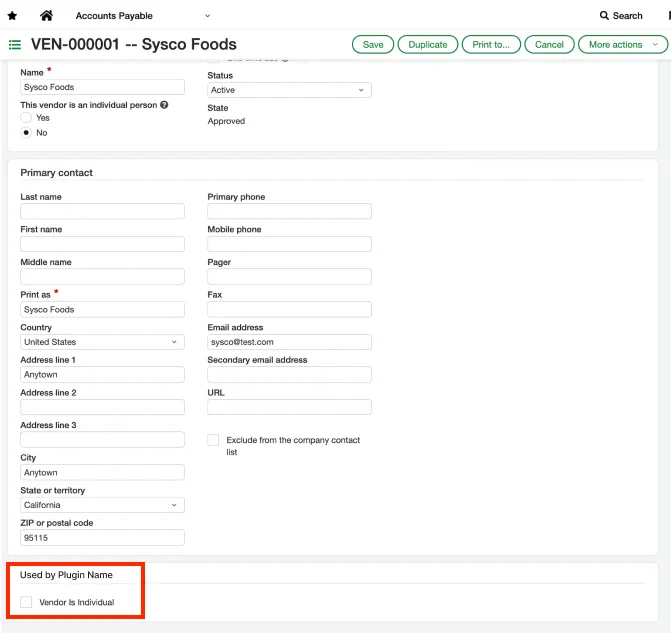
In addition, the Intacct plugin now features an improved "Vendor is Individual" custom field on the Vendor page with cleaner presentation and enhanced usability. The field has been updated and now includes a helpful tooltip that reads "Used by your bank plugin" when users hover over it, making its purpose immediately clear.
Vendor is Individual Custom Field
Bug Fixes
We’ve resolved a scrolling issue on the Balances and Transactions page, ensuring that clients with extensive account lists can now effortlessly view and access all bank accounts beyond the initial screen layout.
May 2026
2026.6 - May 13, 2026
Improved
Bank Accounts Page Enhancements.
Improved
Enhanced status accuracy for Payment History.
Improvements
We are excited to announce a streamlined UI refresh and enhanced data visibility for our clients. This update focuses on better organization for diverse account types and improved transaction tracking.
The page you know as Balances and Transactions is evolving. To support our expanding ecosystem of account types, we have rebranded this space to Bank Accounts. This new UI provides a cleaner foundation for managing multiple financial streams in one place.
To help you identify partners and sources faster, we’ve added a Counterparty Name column to the Transactions model.
NOTE: This column will appear blank as we are working on extracting out this information.
2
Dedicated Deposit Account Tabs
Organization just got easier. Use the new Deposit Account Type tab to instantly access all information related to your checking and savings accounts, keeping them distinct from other account types.
3
Enhanced Filtering & Search
Stop digging through rows of data. You can now perform targeted searches and filter your views by:
Bank Reference
Customer Reference
Amount
Description
Post Date
4
Visual UI Refresh & Country Identifiers
We’ve added Country Images (flags/identifiers) to the account interface. This allows you to spot the geographic source of funds and account origins at a single glance, providing better global context for your Treasury team.
We’ve also updated the Payment History page to ensure all transaction statuses are accurately represented. Records designated as "Completed with Change" now populate correctly within your history view. This update ensures the continued integrity of your payment data, providing a comprehensive and reliable audit trail for all finalized transactions.
April 2026
2026.5 - April 15, 2026
Improved
General improvements and bug fixes.
March 2026
2026.4 - March 11, 2026
Improved
General improvements and bug fixes.
February 2026
2026.3 - February 11, 2026
Improved
General improvements and bug fixes.
January 2026
2026.1 - January 14, 2026
Improved
General improvements and bug fixes.
2025
December 2025
2025.16 - December 10, 2025
Fixed
General improvements and bug fixes.
November 2025
2025.15 - November 12, 2025
Fixed
General improvements and bug fixes.
October 2025
2025.14 - October 15, 2025
Fixed
General improvements and bug fixes.
September 2025
2025.13 - September 10, 2025
Improved
As part of our ongoing efforts to maintain consistency across the platform, we’ve updated the Payment Details page within the Activity view to reflect current interface standards.
Improved
We've updated the Open Bills page to improve how credits are applied. Now, credits will be seamlessly and accurately applied to a wider range of transaction amounts, making your experience smoother and more reliable.
August 2025
2025.12 - August 13, 2025
Improved
We've updated the plugin to support email addresses with multiple periods in their domain names. This improvement ensures greater flexibility and accuracy when entering and storing email information. You can now successfully add and validate email addresses like [email protected].
Fixed
The vendor approval feature has been improved to handle email addresses in a case-insensitive manner (e.g., [email protected]). This ensures that users can approve requests regardless of how their email address is capitalized.