NOTE: These updates are part of our October 2026 release. While you may see these features documented in our guides earlier, please note that all changes will officially go live on October 14, 2026.
October 2026
October 14, 2026
Improved
Interface refinements and usability improvements.
Improvements
Table headers now remain fixed in view while scrolling through long lists on the Bank Accounts and Account Transfers pages and their History tabs, allowing you to reference column labels without returning to the top of the page.
September 2026
September 16, 2026
Added
Introducing the Account Transfers (A2A) experience.
Improved
Interface refinements and usability improvements.
New Features Added
We are excited to introduce Account Transfers (QBO), a brand-new feature for the FISPAN Sync plugin. This feature allows you to seamlessly manage and execute transfers between your accounts directly within your ERP, featuring a modern interface, robust tracking tools, and enhanced operational controls.
To access this feature, please reach out to your Bank Representative.
1
Modern Interface
Seamlessly initiate transfers with a guided workflow, quickly select accounts and view balances (Step 1), then review a comprehensive summary before final confirmation (Step 2).
2
Proactive Overdraft Warnings
Avoid processing errors with "soft warning" alerts on the amount field and a confirmation banner on the review screen.
3
History & CSV Export
Easily track transfers with a searchable, filterable history log, detailed transfer views, and CSV downloads.
4
Detailed Action Logs
Maintain a clear audit trail with timestamped status tracking for every transfer.
5
Approval-Aware Workflows
Automatically routes transfers through your existing internal Payment Approvals process before sending them to the bank.
Improvements
We've made a series of enhancements across the plugin to improve usability and visual clarity:
Refined payment Action Log layout: The Action Log timeline now displays with correct alignment, spacing, and styling, making it easier to track payment statuses at a glance.
Table headers now stay visible as you scroll: Table headers now remain fixed in view while scrolling through long lists on the Accounts Payable, History, Positive Pay and Vendors pages, allowing you to reference column labels without returning to the top of the page.
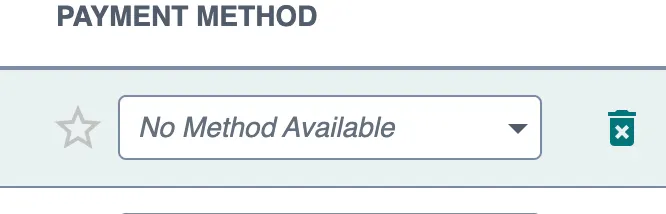
Clearer labeling when no payment methods are available: Payment method fields now display "No Method Available" when a vendor or employee has no configured payment methods, clearly indicating that no selection can be made. This applies across all payment method fields and drop-downs.
Displaying No Method Available
Improved guidance for setting up approval workflows: The Customers Bank plugin now offers clearer direction when approval rules have not yet been configured, distinguishing between rules that still need to be set up and an empty approval queue. When approval rules aren't yet in place in the FISPAN Portal, users see a helpful "Approval Rules Required" screen with direct links to the configuration area, guiding them to complete setup before processing payment or vendor approvals.
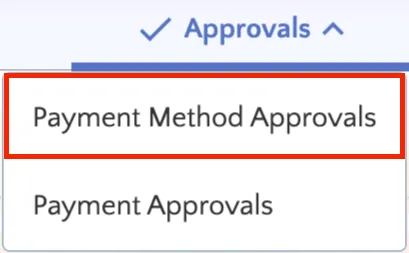
Clearer labeling for vendor change reviews: The "Vendor Accounts" section under Approvals is now labeled "Payment Method Approvals" to clearly indicate that pending updates relate specifically to vendor payment methods and bank details. This is a naming change only and does not affect existing permissions or pending requests.
"Vendor Accounts" under Approvals is now renamed "Payment Method Approvals"
August 2026
August 12, 2026
Added
Introducing the Positive Pay feature.
Added
Introducing Vendor Approvals.
Improved
Improved tabs alignment.
New Features Added
New Features Added
We’re excited to introduce the Positive Pay (QBO) feature, designed to enhance the security and efficiency of your check payment process. Now you can quickly and safely send detailed check files directly to your bank, reducing fraud risk and simplifying your payment workflows.
To access this feature, please reach out to your Bank Representative.
1
Streamlined Check Transmission
Automatically extract check details from QuickBooks Online and transmit your entire check run to the bank with just a few clicks, saving time and minimizing manual effort.
2
Real-Time Dashboard & Alerts
See counts of Open, Failed, and Invalid checks at a glance, with instant alerts highlighting issues that need your attention.
3
Seamless Payment Approvals Integration
If Payment Approvals is enabled, Positive Pay transactions move into the approval workflow before final transmission, ensuring proper controls while preventing delays.
4
Comprehensive Audit Trail & History
Track every transmission’s real-time status, Completed, Failed, or In Progress, with detailed feedback messages and who initiated the transmission.
5
Exception Handling & Resolution
Easily identify invalid checks caused by bank account mismatches and resolve issues through the FISPAN Portal. Unwanted checks can be removed from the plugin without affecting QuickBooks Online data.
We're also excited to introduce Payment Method Approvals (QBO), designed to strengthen fraud prevention and internal controls around vendor payment information. Now you can require review and approval before sensitive vendor changes, such as bank account updates, address modifications, and email changes, take effect in your payment workflows.
To access this feature, please reach out to your Bank Representative.
1
Controlled Vendor Changes
Add a formal approval layer for vendor bank account, address, and email updates, ensuring no sensitive change flows into payment operations without proper review.
2
Real-Time Payment Safeguards
While a vendor change is pending approval, payments for that vendor are automatically blocked on the Pay Bills page, preventing transactions against unverified information.
3
Detailed Change Comparison
Every approval request includes a Detailed Breakdown showing the exact proposed changes; additions, updates, or deletions, so approvers can make informed decisions at a glance.
4
Multi-Tier Approval Workflows
Configure single or multi-tier approval rules to match your organization's control requirements, with clear progress tracking at every stage.
5
ERP-Synced Change Awareness
Vendor address and email changes made directly in QuickBooks Online are automatically surfaced in the approval workflow, keeping your plugin and ERP data consistent.
6
Comprehensive Approval History & Audit Trail
Track every approval and rejection with full details, who made the decision, when, and why, giving your team a reliable record for compliance and internal review.
Improvements
FISPAN Sync now maintains seamless tab alignment across all display scaling and browser zoom levels, including magnification up to 200%. This update ensures a smooth, consistent navigation experience and improved accessibility for users who rely on higher screen zoom settings.
July 2026
July 15, 2026
Added
Payment Approvals is now available.
Improved
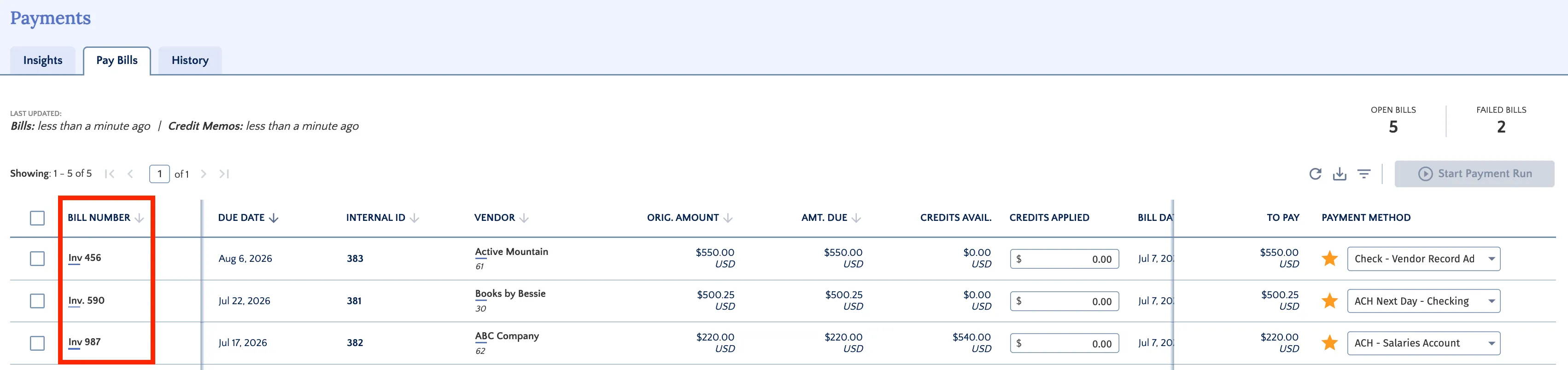
Added Bill Number column.
New Features Added
We're pleased to announce that Payment Approvals (QBO) is now available for QuickBooks Online FISPAN Sync. This feature integrates a secure, multi-tiered payment approval workflow directly into your FISPAN Sync dashboard, giving your organization greater control over outgoing payments.
1
Global and Dedicated Workflows
Apply a default workflow to all payments, or create dedicated workflows for specific bank accounts and payment methods.
2
Multi-Tiered Approvals
Configure up to three approval tiers, each with customizable thresholds, up to five approvers, and the number of approvals required.
3
Individual and Bulk Actions
Review, approve, or reject payments one at a time or in bulk (up to 1,000 at once) from the Payment Approval Request page.
4
Complete Audit Trail
Track every decision on the Approval History page, with export capability for record-keeping and analysis.
Improvements
We've added a dedicated Bill Number column to the Pay Bill page. Bills synced from QuickBooks Online now display the exact QuickBooks "Bill no." on each record, making it faster and easier to match your records.
June 2026
June 10, 2026
Added
User-level permissions improvements for admin users.
Improved
The new QuickBooks Online FISPAN Sync interface is now the default experience.
New Features Added
QuickBooks Online FISPAN Sync now includes enhanced user-level permission controls that provide more granular access management for administrators. The system enforces role-based permissions, ensuring that users only see and can interact with features and data appropriate to their assigned roles.
Improvements
Following a one-month preview period, our upgraded interface is now the default experience for all users, and the legacy interface has been retired. Simply log in to start using the upgraded features.
May 2026
May 13, 2026
Improved
Preview the updated QuickBooks Online FISPAN Sync plugin experience.
Enhanced Feature
As part of our commitment to continue delivering a better user experience, we are introducing an enhanced version of the QuickBooks Online FISPAN Sync plugin with an updated interface, better performance, and expanded features.
This release is available as an opt-in experience, giving you early access to explore the new look and functionality before the full rollout.
The previous interface will remain accessible and supported until it is officially retired on June 10, 2026.
April
April 08, 2026
Improved
Enhanced user experience for FISPAN Sync with QuickBooks Online.
Improvements
As part of our commitment to delivering a modern, reliable, and scalable plugin, we are excited to announce a significant upgrade to your integration experience through a new and improved user interface: QuickBooks Online FISPAN Sync.
This evolution is designed to streamline your workflow and provide a more intuitive way to manage your business needs. Clients require no action to receive this update; upon your next login, you will automatically see the new interface.
2025
November
November 12, 2025
Improved
Improvements to the display of transaction descriptions.
Improvements
We’ve enhanced the display of transaction descriptions to ensure better readability and alignment across the Balances and Transactions page. Long descriptions are now automatically truncated with an ellipsis (…) and display the full text on hover for a smoother user experience.
October
October 15, 2025
Improved
We've introduced an enhancement to the Bill Payments page layout, specifically improving how payment tables are displayed. This update provides a seamless and more consistent scrolling experience within these tables, making it easier to view and interact with your payment details.
Fixed
We've improved the Dashboard layout to fix a formatting issue. The boxes in the first row now correctly stay within their boundaries, eliminating unwanted stretching. This results in a much cleaner and more consistent visual experience
September
September 10, 2025
Improved
We've introduced a new and convenient way to manage your "Open Bills". You can now easily sort your list of open bills by clicking on any of the column headers. This enhancement provides you with greater control and flexibility, allowing you to quickly organize your bill information by criteria such as Bill ID, Due Date, Vendor, Orig. Amount, Amount Due, Bill Date, To Pay, and Payment Method.
Improved
We've made improvements to the filtering functionality. When applying a filter, such as a vendor name filter, the system now correctly displays the filtered results, providing a more consistent and reliable user experience.
August
August 13, 2025
Improved
The Bill Payments Page has been updated to improve clarity and user experience. The "Bill Number" column has been renamed to "Bill ID." This field has also been enhanced to display the invoice number when one is available.
Improved
We've enhanced the dashboard's date range functionality to give you more flexibility and a clearer view of your data. The dashboard now supports rolling date ranges, such as the last 30 days, and ensures that your data is not reset at the beginning of each month.
Fixed
The payment status display has been updated to include a new status, "Waiting for Approval" to all relevant History pages. This improvement gives you a more precise understanding of where your payment is in the process, making it easier to track transactions that are pending review. Please note that this new status will be visible on all new transactions going forward.
July
July 16, 2025
Improved
To enhance readability and design consistency, we’ve updated the Dashboard so that all headers and links display the correct font styles.
Improved
We've improved how payment methods are shown by resolving a label display issue. Payment options now appear with the correct labels for a more intuitive experience.
Fixed
We've resolved an issue that was preventing vendor email updates from being saved. You can now confidently update vendor emails to keep your records accurate and up to date.
June
June 11, 2025
Improved
We have made it easier to manage your default bill payment methods. Now, when you hover over the star icon next to a payment method, a clear tooltip will appear. This helps you quickly identify your current default or easily set a new one, streamlining your payment management.
Fixed
We have resolved an issue where some titles were displaying raw label names. Titles should now appear clearer and easier to understand across the plugin.
May
May 14, 2025
Fixed
We have fixed an issue where clients have to manually refresh the Payment History page to see the latest bill payment records. With this fix, switching over to the Payment History page now displays an up-to-date list of all bill payments.
Fixed
We have resolved an issue causing inconsistent sizing of dashboard placeholders when the data insights were not available. Placeholders now display with a consistent and appropriate size for improved visual presentation.