Partial Payments (Business Central)
Initiate Partial Payments directly from Business Central. This feature gives you the flexibility to pay only a portion of a Bill, supporting various business needs and helping you better manage your cash flow.
Partial Payments are available to all Business Central users on plugin version 2026.8.0.0 or later.
Making Partial Payments
Follow these steps to make your first Partial Payment.
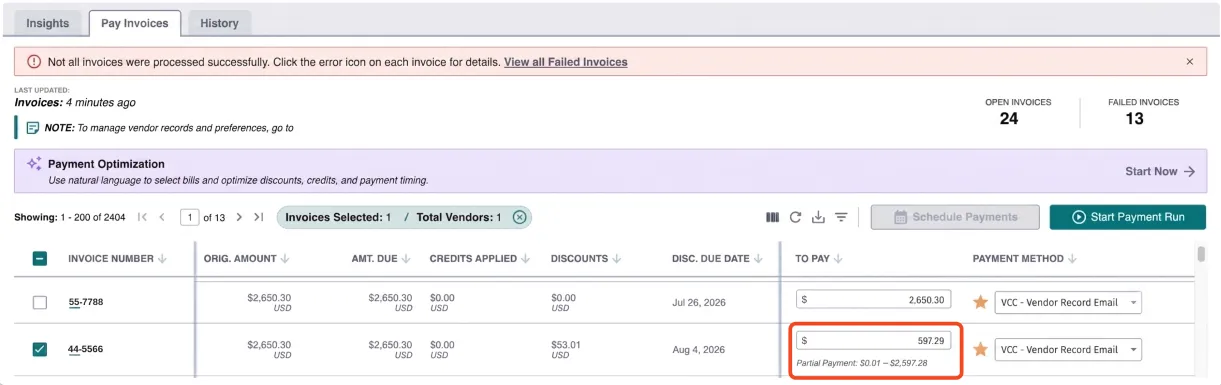
Modify the To Pay Amount
The To Pay column is now modifiable. You can enter any amount as long as:
- Minimum partial payment amount is $0.01
- The entered amount cannot exceed the current maximum payable amount
- The maximum payable amount depends on the Bill’s current due amount, discount state, and credits
NOTE: When you edit the To Pay column, a message appears in the format "Partial Payment: $0.01 – $X", where X is the maximum amount allowed for that bill in its current state.
Add Any Applicable Credits (Adjustments)
Partial Payments can be used in combination with adjustments.
IMPORTANT: Discounts are applied to the Final Payment only. To take advantage of available discounts, your payment must meet one of the following criteria:
- Pay the Bill in full with a single Payment.
- Make the Final Partial Payment on the Bill. The discount can only be applied when this payment reduces the outstanding amount to zero.
In Business Central, any available credits and discounts are automatically factored into the maximum amount you can enter in the To Pay column. There's no separate step to apply them, the maximum payable amount already reflects any applicable discount and credit. For example, on a $500 bill with a $100 discount and a $50 credit available, the maximum you can pay is $350.
Select the Bills to Pay
Select the Bills you would like to pay. You can add multiple Bills (even with Partial Payments) to one Payment Run.
Confirm Payments
Confirm the payments to complete your first Partial Payment.
The Bill(s) you've partially paid will remain on the Pay Page. They will show the updated outstanding amount due, allowing you to make future payments until the balance is fully settled. You can apply as many Partial Payments as needed until the bill is fully paid.