Setting Up Permissions (NetSuite)
Ensure your users have the correct permissions to access Bank Feeds and are part of the appropriate audience for the relevant scripts by following this guide.
Confirm User(s) Permissions
Go to Setup → User/Roles → Manage Roles
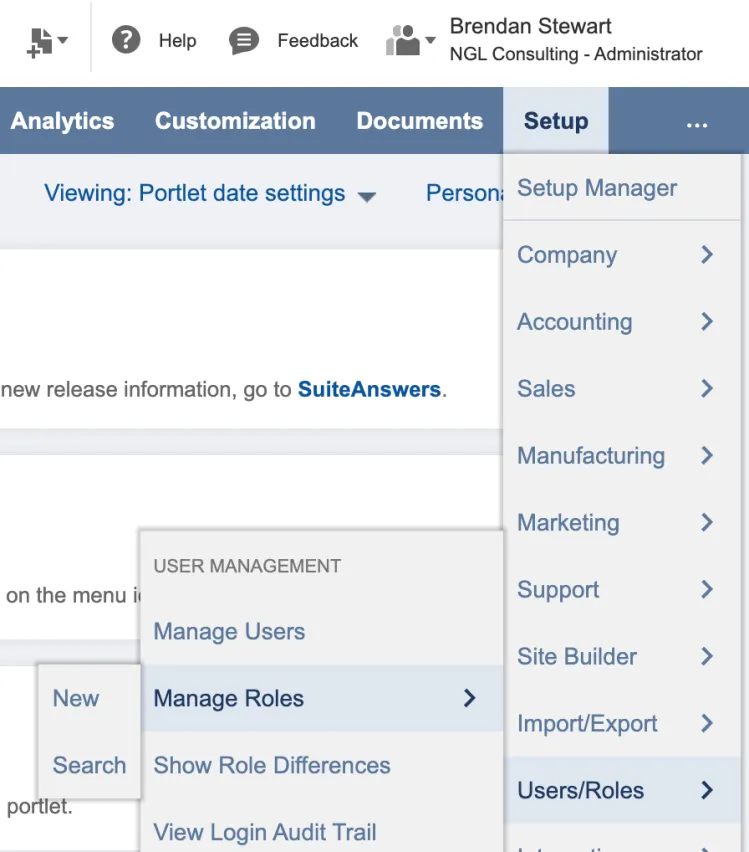
Under Manage Roles, select Edit on the role you would like to edit.
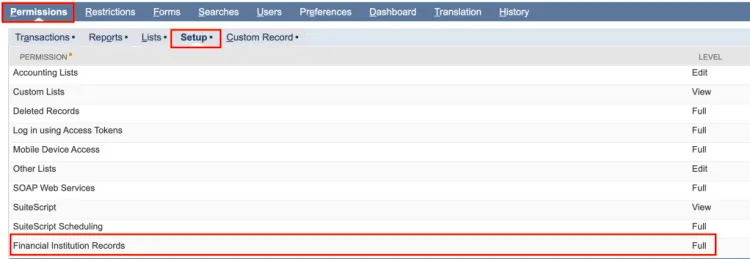
After selecting Edit, go to the Permissions tab → Setup tab.
Ensure the Permission, Financial Institution Records is defined at the level Full.
Confirm User(s) Scripts
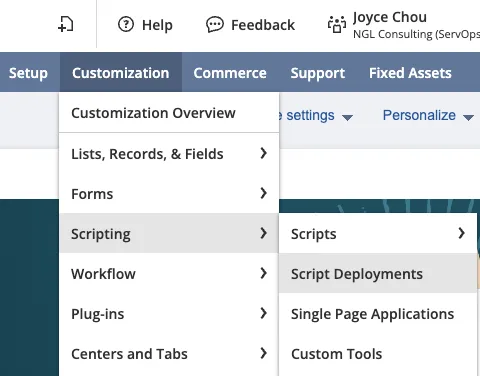
Navigate to Customization → Scripting → Script Deployment.
For more information on Scripts, navigate to the product guide page, NetSuite → Installation → Plugin Access Management
Use the following filters:
- On the Type dropdown, select Suitelet
- On the API Version dropdown, select 2.1.
Select Edit on customdeploy_bmo_rpt_feed_s, BMO Trans Feed Config
Add employee roles by selecting the appropriate employee, department or role you would like to assign. Then, select Save.
